Create an app or add a feature
What do you want to accomplish?
Guidance target: Harness 1.5.1. Published guidance. Read installation and version limits.
Move from an idea to a clear request, a reviewable plan and evidence you can assess. Your assistant handles the working details; you make the consequential decisions.
Browse all 21 goals
What do you want to accomplish?
Each topic follows the same local activity-report and CSV-export example. Use any topic on its own. The saved-form screenshots below were captured with Harness 1.5.0. They are historical examples; current guidance is checked separately against the 1.5.1 source. Illustrative outputs are labeled.
How can I turn my feature idea into a clear work request?Decide what success looks like before the assistant starts changing your app.
Example: add CSV export. You want to open selected project activity in a spreadsheet without copying rows. Start by agreeing which rows and columns belong in the export and what must stay unchanged.
You leave with: a saved draft request with scope, success criteria and a human review point.
Start with this prompt
Copy this into your coding assistant, with your project open:
Help me turn this feature idea into a clear work request: add CSV export to the activity report so I can use selected rows in a spreadsheet.

Inspect the existing project first. Reuse its visibility rules and filters. Ask about consequential gaps, including columns, empty results, formula-like text and overwriting files. Recommend an option and explain its tradeoffs when I need to choose.

Use attune-harness to save a draft with the goal, exact file scope, context, constraints and observable success criteria. Show me the resulting request and the current review point. Stop before approving the request, changing app files or calling paid participants.
From idea to a request you can review
- Describe the useful result. “I want the activity I can already see exported to a spreadsheet.” Your assistant inspects the app before suggesting file scope. This example uses a synthetic local CLI; its user identity and visibility rules simulate access control.
- Settle the decisions that affect the result. In the example, export the same visible rows as the list, keep its filters, use seven named columns and produce headers only when nothing matches. Choose the formula-text policy and refuse to replace an existing file. The assistant prepares the relevant questions; Harness does not discover unrecorded requirements by itself.
- Fill in the current form and save answers. The assistant prepares a saved draft and opens its local Harness form. Answer in ordinary language. Saving keeps an unapproved draft; if answers are incomplete, the next current form asks what remains.
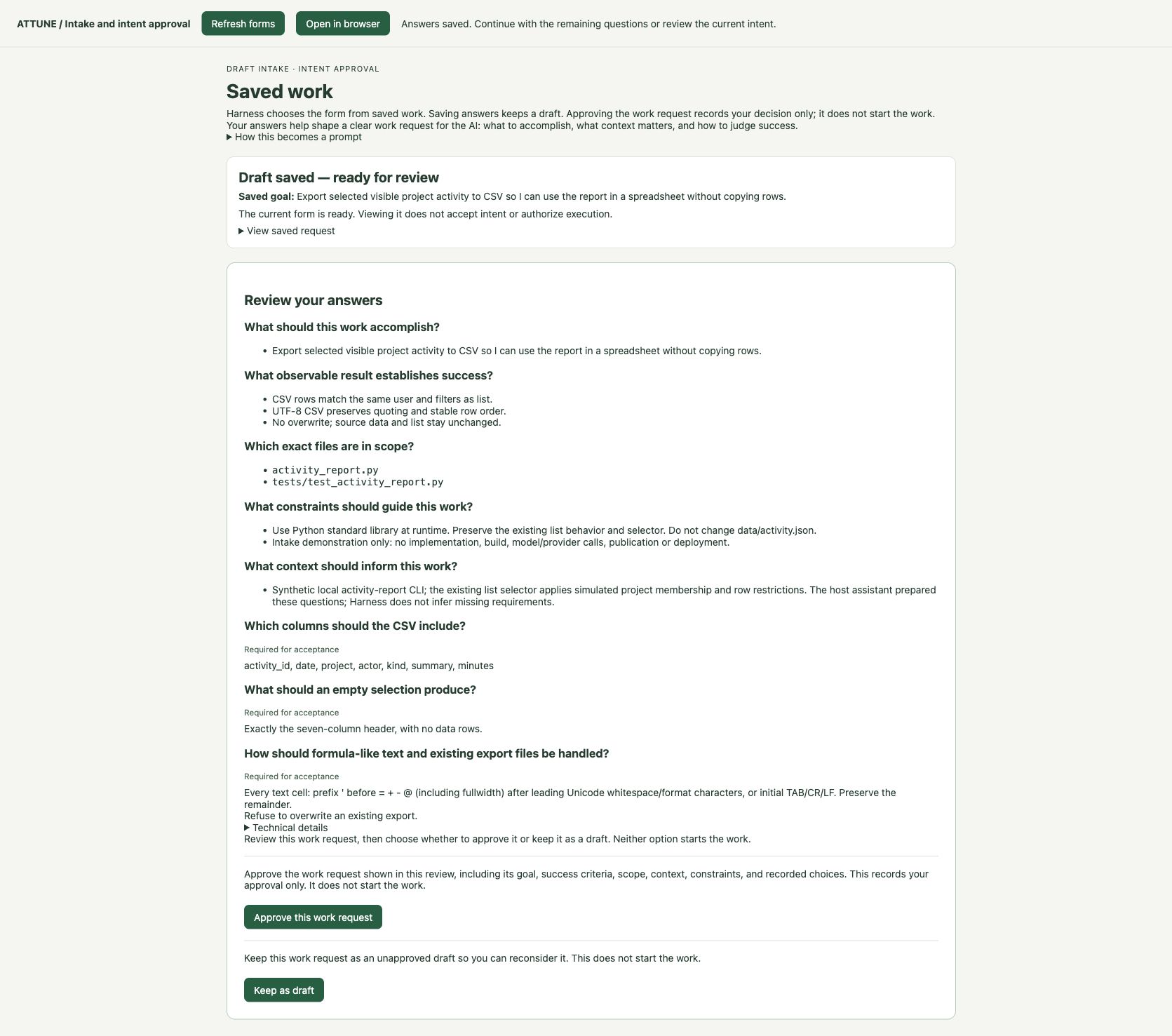
- Review the whole request before deciding. Check the goal, success criteria, exact files, constraints and recorded answers together. Change a mistaken answer or ask the assistant to revise scope before approving. Review the refreshed request after any revision.
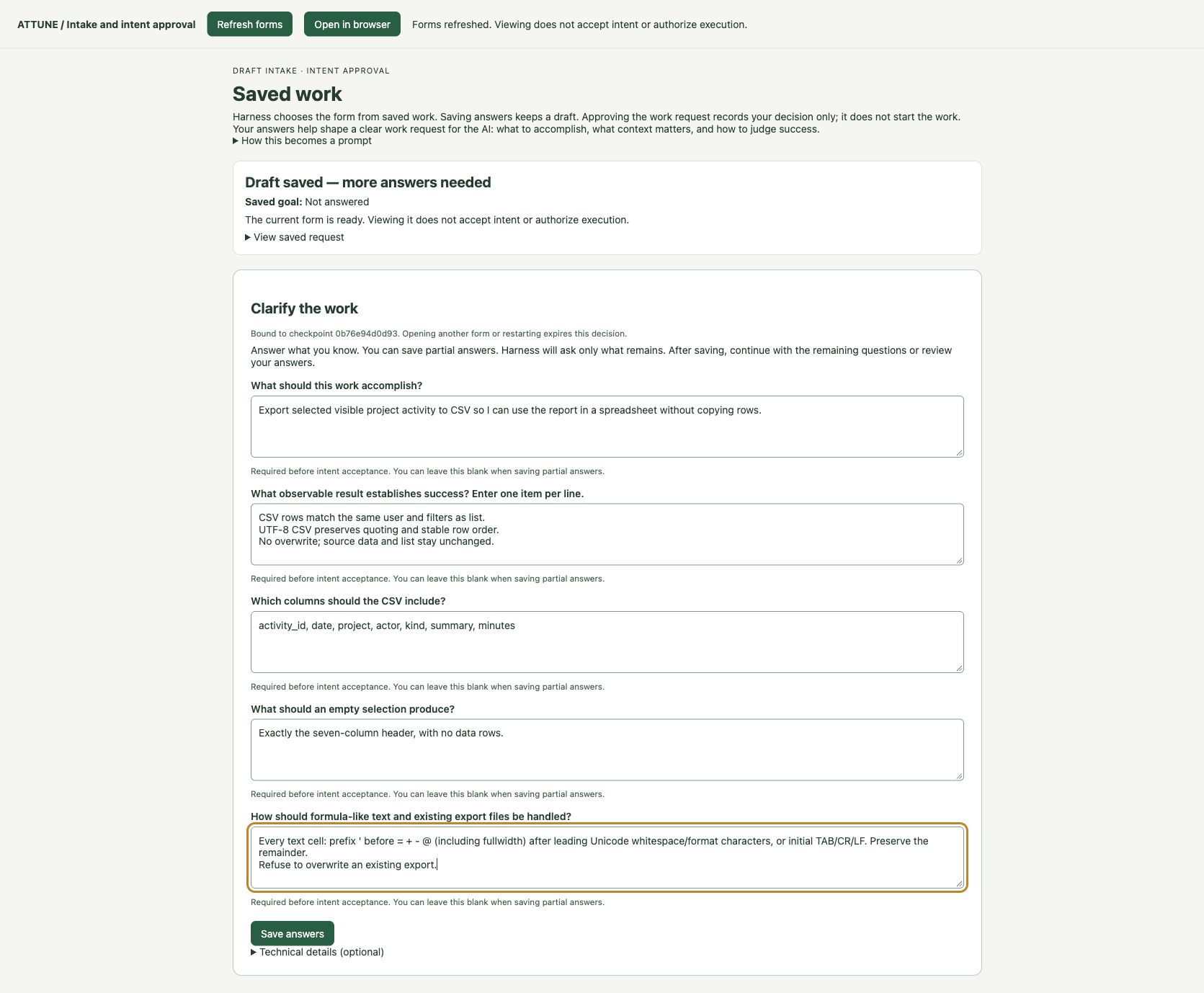
The resulting work request
Expect a saved request with its revision, current checkpoint and any remaining questions or a review screen. Your answers carry into that review. Here is the actual saved example, presented as readable text.
Draft saved · awaiting your review
Add CSV export to the activity report
- Goal
- Export selected visible project activity to CSV so I can use the report in a spreadsheet without copying rows.
- Success criteria
- CSV rows match the same user and filters as list.
- UTF-8 CSV preserves quoting and stable row order.
- No overwrite; source data and list stay unchanged.
- Exact file scope
activity_report.pyandtests/test_activity_report.py.- Context
- A synthetic activity-report CLI. The existing list selector applies simulated project membership and row restrictions. The assistant prepared the questions.
- Constraints
- Use Python’s standard library at runtime. Preserve the existing list behavior and selector. Do not change
data/activity.json. This demonstration authorizes intake only: no implementation, build, model/provider calls, publication or deployment. - Columns, in order
activity_id, date, project, actor, kind, summary, minutes- Empty selection
- Exactly the seven-column header, with no data rows.
- Formula-like text and existing files
- For every text cell, prefix an apostrophe before
= + - @(including fullwidth forms) after leading Unicode whitespace or format characters, or when the value starts with TAB, CR or LF. Preserve the remainder. Refuse to overwrite an existing export.
This formula policy deliberately changes some exported text. Review whether that tradeoff fits your spreadsheet workflow; it is not a guarantee for every spreadsheet application.
How to review this request
- Follow a real selection. Can you explain which rows a chosen user and filter should export? The existing tutorial uses viewer + atlas + review + October 11–12, 2026, with records
a-0002anda-0004. Treat that as a proposed check, not a result from this intake. - Read the edge cases. Confirm column order, an empty export, Unicode, commas, quotes and multiline text. Ask for concrete ordering and filter/date rules before implementation if “stable order” or “same filters” leaves room for disagreement.
- Check the boundary. Are these the right files, and is the fixture protected? The request should preserve existing visibility rules and refuse overwrites. A request being ready for review does not prove those behaviors work.
What your assistant does, and what Harness adds
Your coding assistant can discuss an idea, inspect code using its available tools, ask questions and draft a request. With authorization it can also edit files and run checks. Those are assistant capabilities; installing Harness does not create them.
Attune Harness adds a saved, structured request; forms driven by that saved state; revision and checkpoint binding; and an explicit intent decision. It selects prompt, XML or spec from work facts supplied by the host. For separately prepared and authorized execution, its plan/build workflow can retain bounded effects and check evidence. This local forms interface handles intake and intent decisions; it has no build controls.
The starter prompt asks the assistant to use Harness. Its skill routes the request to the installed CLI. The demo’s deterministic participant is a placeholder and was never dispatched; no model-planning or model-building quality claim is established here.
Sources: 1.5.1 plan/build guide, the inspected 1.5.1 form and decision source, and the existing local CSV tutorial. Read the verification and limitations.
What if saving my request stops because a registry is missing?
Select an existing participant registry with --config. To create an offline demo registry, run init with --project naming your project directory. It creates participants.json in that directory.
When you retry plan, pass --config with the created file’s absolute path. For review, also pass that path when your working directory differs from the project or the failed command named another registry. Relative --config paths resolve from the command’s working directory; absolute paths are used directly. Creating a registry does not accept or execute work.
Keep existing registries and the original refusal for inspection. If no task was created, there is no saved task to inspect with status. Check path and task selections before continuing.
Technical reference: the commands behind this example
These are preparation and inspection commands. Supply real reviewed request and registry files, a supported project and an unused task directory outside it. No command here approves or builds work.
attune-harness plan --request REQUEST.json --project PROJECT \
  --config REGISTRY.json --task-dir TASK

# The installed Harness interpreter must run this module.
python -m attune_harness.gui --task /absolute/path/to/TASK --edit

attune-harness plan --task-dir TASK --decision
attune-harness status TASK
Example: create a demo registry and save an unapproved draft
Replace each absolute placeholder with your selected path. Use an existing complete work request; request.json is not created by this init command. Choose a new task directory. The registry uses offline deterministic participants.
attune-harness init --project /absolute/path/to/csv-project
attune-harness plan --request /absolute/path/to/csv-project/request.json \
  --project /absolute/path/to/csv-project \
  --config /absolute/path/to/csv-project/participants.json \
  --task-dir /absolute/path/to/csv-plan-draft
Expected result: init reports created with the demo profile. plan saves a draft with no acceptance, planning or build execution. Inspect that draft before making any approval decision. Merely repeating a command that omitted --config will still fail.
The browser’s private launcher link grants access to that local forms session. Do not publish it. Use the current form after a refresh or restart. For CLI acceptance, read attune-harness plan --help and use only the checkpoint you have reviewed.
What should the first version of my app include?Choose a useful, manageable starting point.
Example: start with a local activity report and CSV export. Choose a complete useful journey before adding more surfaces or integrations.
You leave with: a concise first-version brief with in/out scope, assumptions and success criteria.
Start with this prompt
Help me choose a useful first version of a local activity-reporting app. The user wants to inspect project activity, filter it and export selected visible rows to a spreadsheet.

Inspect the existing project and CSV contract first. Recommend the smallest version that completes that user journey. Show what is in, what is out, the key assumptions, dependencies, risks and observable success criteria. Explain the consequence of postponing each optional feature. Ask me only about consequential gaps.

Write a short first-version brief in readable text. If Harness intake helps preserve the agreed scope, prepare a draft using the current supported request format. Do not invent file paths, assume production authentication, dispatch participants or start implementation. Show the decisions I need to make next.
Follow these steps
- Name the complete user journey. In this example: choose a simulated user → list visible activity → narrow the selection → export it → inspect the CSV. A first version must let someone finish that journey.
- Choose what makes that journey useful. Keep existing visibility/filter rules, stable order and the agreed seven-column CSV contract. Preserve Unicode and multiline text, the formula-text policy and refusal to overwrite an existing file.
- Move independent features outside the first version. A web UI, cloud sync, production authentication and remote integrations are excluded here. Simulated identity cannot be described as production access control. If a real user needs a browser or shared access, revisit the first-version choice before proceeding.
- Turn the scope into a short brief. Record intended user, useful result, in/out scope, assumptions and checks. Ask the assistant to connect each included feature to the user journey and expose unresolved choices.
- Review the tradeoffs, then continue. Decide whether this local first version is useful enough. Carry the agreed brief into the project spec or, for a small feature, a work request.
Illustrative output · not an accepted Harness result
First-version brief: local activity reporting
User outcome: inspect visible synthetic project activity and take the selected rows into a spreadsheet.

IN: local CLI; simulated user selection; list; project/kind/date/search filters; CSV export using the established contract; clear empty-result and file-conflict behavior.
OUT: web UI; real authentication; remote data; cloud sync; production integrations; deployment.
ASSUMPTIONS: synthetic local data is appropriate; the user can use a CLI; a named spreadsheet/import configuration will be checked separately.
SUCCESS: list and export select the same visible rows; rows remain in date/ID order; columns and encoding match the contract; empty exports have headers only; no overwrite or source-data change.
DECISIONS: confirm that a local CLI serves this first version. Do not silently carry that assumption into a production app.
How to review the brief
- Can the intended user complete the whole journey with the included features?
- Does each inclusion support that outcome, and does every exclusion state the consequence?
- Are assumptions about identity, interface, data and spreadsheet behavior visible?
What your assistant does, and what Harness adds
Your assistant can inspect the project, compare scope options and draft the brief. You choose the product tradeoffs.
Harness can retain a structured request and its checkpoint when you choose to use intake. It has no dedicated automatic MVP selector; authoring format is selected from work facts supplied by the host.
Technical reference: commands and limits
Preparation and inspection only. A brief can remain an ordinary document; a small task does not automatically need a complex Spec.
# After the assistant prepares the actual request and registry:
attune-harness plan --request REQUEST.json --project PROJECT \
  --config REGISTRY.json --task-dir TASK
attune-harness plan --task-dir TASK --decision
attune-harness status TASK
How can I use a roundtable to create a clear project spec?Leave with requirements, observable checks and open decisions you can review before building.
You leave with: an initial spec and a proposed review copy with unresolved decisions visible. The spec and wording worksheet are illustrative; no successful live consultation is claimed.
Try the example: a small local app that lists project activity, applies filters and exports selected visible rows to CSV. Follow the filled example below, then prepare a review copy. You can also copy the prompts into your assistant for your own project.
Describe the first useful version
Give the assistant enough context to draft a spec. It should inspect the existing project and ask about decisions that change the outcome.
- Who and why
- A person reviewing synthetic project activity wants to open selected rows in a spreadsheet without copying them.
- First useful version
- A local command-line app: choose a simulated user, list visible activity, filter it and export the same selection.
- Keep consistent
- Existing membership/row restrictions, filters, stable order, seven CSV columns, formula-text policy and no overwrites.
- Outside this version
- Web UI, production authentication, remote data, cloud sync and deployment.
Start my own project: copy a spec-drafting prompt
Help me create a reviewable spec for a small local activity-reporting app with filters and CSV export.

Inspect BRIEF.md, CSV-CONTRACT-NOTES.md and the existing example first. Draft the user outcome, first-version scope, non-goals, workflow, data and access assumptions, numbered requirements, observable acceptance checks, task dependencies and unresolved decisions. Preserve the established CSV contract and distinguish simulated identity from production authentication.

Show me the initial spec in readable text. Recommend options for consequential choices and explain the tradeoffs. Stop before model consultations, implementation or approval. Tell me what needs my decision next.
Expected output: an initial spec with scope, non-goals, numbered requirements, acceptance checks, dependencies and unresolved choices. For this example, the actual initial draft contains R1–R8, AC1–AC8 and T1–T3.
Read the complete initial spec — preserved v0.1
# Local activity reporting app — initial spec v0.1

Status: host-authored initial draft for review. No roundtable has reviewed it; no implementation is approved.

## Outcome and scope

Let a person inspect, filter and export synthetic project activity through a small local command-line app. Use BRIEF.md for the product boundary and CSV-CONTRACT-NOTES.md for the established selection and file contract. The fixture's identity rules simulate access; they are not a production security system.

## Workflow

1. Select a simulated user and optionally project, kind, inclusive date range and summary search.
2. List the selected visible activity in stable order.
3. Export the same selection to a new CSV file.
4. Inspect the produced file and review retained check results before accepting implementation.

## Requirements

- R1: Validate the local input schema before presenting or exporting rows. Reject unknown users, duplicate IDs, invalid references, dates, types, negative minutes and disallowed control characters.
- R2: Apply the existing membership and row-restriction rules identically to list and export. Never include membership or restriction metadata as public report columns.
- R3: Intersect all active filters with the exact matching and inclusive date semantics in the existing contract; reject reversed date ranges.
- R4: Order selected rows by ascending date and activity ID without a hidden result limit.
- R5: Produce the seven ordered columns and CSV encoding, quoting, escaping and record endings specified in the existing contract. Preserve Unicode and multiline text through a CSV parser.
- R6: Apply the exact formula-text transformation to every text column in exports, keep minutes numeric and preserve literal text in list output. Make the transformation and importer limitations visible in user guidance.
- R7: Emit only headers for an empty visible selection, refuse overwrites, validate before creating output, clean up a partial new file after a write failure, and keep the fixture unchanged.
- R8: The same source, user and filters must produce identical CSV bytes. Expose the public exported row count without mixing diagnostics into CSV content.

## Acceptance checks

- AC1 (R1): Invalid fixture variants fail before an export file exists; unknown identity fails closed.
- AC2 (R2, R3): Independently assert selection parity and exclusions for memberships, null/named/empty restrictions, each filter and intersecting filters.
- AC3 (R3, R4): Exercise both date boundaries, a reversed range, Unicode-casefold summary search and order after changing input row order.
- AC4 (R5): Parse actual CLI-generated files and inspect bytes for exact columns, UTF-8/no BOM, quoting, escaped quotes, CRLF records and embedded line endings.
- AC5 (R6): Cover the named formula markers, fullwidth forms, leading whitespace/format characters and initial TAB/CR/LF in every text column; verify unchanged literal list output and typed minutes.
- AC6 (R7): Assert the exact header-only empty file, no overwrite, no file on invalid input and cleanup after an injected write failure.
- AC7 (R8): Compare repeated export bytes, source hashes and the separately reported public row count.
- AC8 (R2–R6): Use viewer/atlas/review/2026-10-11..2026-10-12 as a concrete two-row example; manually inspect Unicode, multiline and transformed text in the intended spreadsheet, recording the application/version and import settings. Do not generalize that check to every importer.

## Proposed task dependencies

- T1: Confirm the contract and fixture shape; prepare independent selection, CSV-byte and failure-case acceptance checks. Human settles any material changes to the contract first.
- T2, after T1: Implement shared validation and selection, then list and export behavior using standard-library runtime dependencies. Preserve the independent checks.
- T3, after T2: Execute the agreed checks, retain output and file evidence, write user guidance and conduct the bounded manual spreadsheet check.

This is a conceptual project plan, not a Harness build-ready task graph or frozen file-effect manifest. Before build acceptance, identify the exact output files, permitted effects and protected executable checks in a separate supported plan.

## Review questions and approvals

Are the requirements precise enough to test? Do the checks establish the user outcome rather than merely echo the implementation? Do the task dependencies preserve independent verification? Does the first version stay within the stated local scope?

The human reviews the revised spec and any consequential choices. Spec acceptance does not grant implementation, provider calls, publication or deployment. Model recommendations remain advisory and require source inspection.
Filled project brief · Established CSV contract · See the earlier filled Harness intake and saved request
Use the roundtable to inspect the draft
Ask for gaps that affect the user, conflicting requirements and missing checks. Require a reason and source citation for each proposed change. A review can reasonably recommend no change.
| Sources | For this example: the synthetic brief, CSV contract notes and initial spec. Inspect the exact selected files and their current revision. |
|---|---|
| Perspectives | Choose complementary user-outcome and implementation/verification perspectives. Verify each exact model on its actual account and CLI route before dispatch. |
| Limit | Review participants, rounds, call limit, data and actual usage route together. A planned limit does not verify billing controls or model availability. |
Copy a prompt to prepare a future consultation for review
Prepare an attune-harness roundtable review of this initial spec. Ask two explicitly selected, verified participants to assess user outcomes, ambiguities, implementation feasibility and independent acceptance checks. Require citations and the strongest counter-case for each proposed change. A no-change finding is acceptable.

Before any model call, show me the frozen source files, question, exact models, one-round/two-dispatch limit, actual billing route and verified usage controls. Stop if the agreed usage limits or model access cannot be established. Do not retry, substitute models or use a paid fallback without a new, explicit decision.

After a permitted run, retain actual successes and failures. Check the cited passages, separate optional advice from required corrections, and propose a finding-to-spec comparison. Keep human decisions open until I make them. Do not implement or publish anything.
Compare proposed changes with the original spec
For an executed review, the assistant checks the cited source before proposing wording. The optional wording in this worksheet is illustrative and has not been validated by a completed consultation. You choose which wording belongs in a draft. Optional advice stays optional; a participant’s recommendation does not make a decision for you.
Try the help worksheet. These controls change only your on-screen review copy. They are a proposed help interaction, not a Harness form or an approval record. Choices reset when you reload; copy or download the draft to keep it.
Take a complete spec to review
Read the full draft, including what stayed unchanged and what still needs a decision. The review copy preserves R1–R8 and T1–T3; only the selected AC3/AC5 clarifications change.
Illustrative draft · no live consultation demonstrated · no implementation approved
Read the complete review draft
Who does what?
- Human: defines the outcome, settles consequential tradeoffs and reviews the exact spec.
- AI / Human: inspect source passages, compare alternatives and turn supported advice into proposed wording.
- AI: drafts and reviews text using its native capabilities. Harness freezes selected inputs and configuration, binds the consultation to a digest, limits dispatches and retains outcomes. It does not supply model availability, correct advice, billing controls or spec acceptance.
Technical reference and retained evidence, last
The installed roundtable CLI has no browser form. The worksheet above belongs to this help example. Preparation and inspection commands do not dispatch participants:
attune-harness roundtable check --config CONFIG.json
attune-harness roundtable prepare --project PROJECT --path BRIEF.md \
  --path SPEC-INITIAL.md --config CONFIG.json --run-dir NEW_RUN
attune-harness roundtable status RUN --format markdown
attune-harness roundtable evidence RUN --format markdownHow can I build my app or feature in reviewable steps?Break the agreed work into small changes you can inspect.
Example: add CSV export while keeping list behavior and the input data intact. Give each step a result and an independent way to check it.
You leave with: a reviewable plan, then actual diffs and check evidence when separately authorized execution succeeds.
Start with this prompt
Help me build the agreed activity-report CSV feature in small, reviewable steps.

First inspect the current project, request/spec, existing changes and any saved Harness task. Preserve unrelated work. Confirm the exact accepted revision; a prose spec or completed intake is not automatically a build-ready plan.

Prepare the current Harness plan with explicit participant assignments, dependencies, exact permitted file effects and protected independent acceptance checks. Explain what each step produces and how it will be checked. Keep the source fixture protected and preserve list behavior.

Show me the current plan, checkpoint and execution requirements before approval. Stop before participant calls or app changes. Do not approve the plan for me, infer usage authority, publish, merge or deploy.
Follow these steps
- Anchor on the current agreement. Read the request/spec and existing task state. The CSV example requires matching list/export selection, the existing file contract and no change to the input fixture. Inspect current changes before choosing files.
- Prepare a build-ready plan. The assistant identifies real files and supported effects, assigns actual participants and orders dependent tasks. Freeze independent acceptance checks before accepting the plan. A list of tasks in a document is a starting point, not that executable contract.
- Review the exact plan and checkpoint. Confirm each permitted effect, protected check, dependency and expected result. Resolve planner findings and questions. A newly staged or revised plan is unaccepted until its current revision is reviewed.
- Authorize the bounded execution separately. Only after plan acceptance and the applicable participant/usage authority should the assistant run the build. You can request a bounded pause; durable operation counts do not equal a guaranteed number of files or a cost ceiling.
- Inspect each result before continuing. Review actual diffs, protected-check outcomes and any required review. A failed or uncertain step needs inspection, not an automatic retry. Finish by comparing the full outcome with the accepted requirements.
Illustrative output · not an accepted Harness result
A reviewable sequence to turn into a supported plan
T1 — Confirm the contract and fixture shape. Prepare independent selection, CSV-byte and failure-case checks. Human resolves material contract changes first.
T2 — After T1, implement shared validation/selection and list/export behavior within the exact accepted file effects.
T3 — After T2, run the agreed checks, retain evidence and document the bounded manual spreadsheet review.

Before build: identify the actual files, allowed effects, participants and protected executable checks. This sequence is conceptual and has not been accepted or executed by Harness.
Expected output and how to review it
Expect the accepted plan reference, per-task outcomes, actual file changes and retained check evidence. Compare the diff with the permitted effects and verify that the fixture and unrelated work remain intact. A successful file write alone does not establish working CSV export.
What your assistant does, and what Harness adds
Your assistant can propose task boundaries, inspect/edit code with authority and explain diffs. It prepares the request/effect structure using the matching documented schema.
Harness binds acceptance to the current plan, supervises supported effects and protected checks, and retains task outcomes. It does not infer your approval from a prose spec or grant provider usage through plan acceptance.
Technical reference: commands and limits
These are command shapes, not an executable plan. External command participants require their authorized --allow-external flag; native participants additionally require --allow-native. The default flags are not a free-execution route.
# Inspect the current plan without acceptance or dispatch:
attune-harness plan --task-dir TASK --decision
attune-harness status TASK

# Separate steps, only after the corresponding reviewed authority:
attune-harness plan --task-dir TASK --accept --checkpoint CURRENT_CHECKPOINT
attune-harness build TASK --checkpoint CURRENT_CHECKPOINT \
  --max-operations REVIEWED_LIMIT
How can I fix something that isn’t working?Reproduce the problem, repair it and check the result.
Example report: an empty CSV selection appears to produce an empty file. Establish the actual failure before choosing a repair.
You leave with: a reproducible failure and, after authorized repair, a scoped diff with before/after evidence.
Start with this prompt
Help me diagnose a possible CSV-export bug: an empty visible selection is expected to create exactly the seven-column header, but the reported export appears empty.

Inspect the current project and actual evidence first. Reproduce the behavior and distinguish the report from what you observe. Do not assume the cause.

If the failure is reproduced, prepare a trusted probe with an independent exact expectation and protected oracle. Prepare an attune-harness fix intake using the supported dedicated checkout, explicit existing-file scope, actual worker and review policy. Show the failing evidence, proposed scope and current approval point.

Stop before accepting the repair, dispatching participants or changing app files. Do not weaken the expected result to make a check pass, retry uncertain effects, publish or deploy.
Follow these steps
- Describe expected and observed behavior separately. The expected empty CSV is one seven-column header record. “The file looks empty” is a report until the assistant inspects its actual bytes and reproduces the selection.
- Keep the failing case independent. Prepare a trusted probe with the exact header expectation and the no-data-row condition. Preserve the probe and its oracle outside the worker’s editable scope. If the check already passes, investigate the reproduction instead of changing correct code.
- Prepare the repair boundary. Inspect existing changes, choose an exclusively owned supported checkout and list only the existing files that may be replaced. Retain task state outside the checkout. The current POSIX fix profile does not create/delete/rename files or use linked worktrees.
- Review before running the repair. Check the failing evidence, allowed files, protected probe, participant assignment, usage route and review policy. Only a separately authorized repair may call the worker or apply a replacement.
- Review the before/after evidence. Inspect the actual diff, a failed-before/passed-after probe and the required reviewer outcome. If effects are uncertain, inspect and use the supported reconciliation path; cancellation is not rollback.
Illustrative output · not an accepted Harness result
Repair report to ask for
Problem: empty selection should export headers only.
Observed baseline: [actual reproduction result and evidence path]
Permitted files: [exact existing paths inspected in the dedicated checkout]
Protected expectation: activity_id,date,project,actor,kind,summary,minutes in the contract's exact CSV encoding/quoting/record format; zero data rows.
Before/after probe: [actual statuses and retained output]
Diff and reviewer: [actual changed lines and review outcome]
Unresolved effects or exclusions: [explicit, or none established]

These fields are a report template. No bug, repair or passing probe was produced by this help section.
How to review a repair
Reject a repair that only changes the check, alters unrelated files or silently drops visibility/filter rules. Read the diff and probe evidence together. A reviewer’s narrative does not replace the probe or your assessment of the user outcome.
What your assistant does, and what Harness adds
Your assistant can investigate the report, propose a reproduction and explain a replacement. The trusted expectation must remain independent of the worker.
Harness retains scoped repair inputs, supervises supported file replacement and probes, and records before/after and review outcomes. It cannot turn a missing reproduction or uncertain write into a verified fix.
Technical reference: commands and limits
The POSIX repair profile needs a dedicated checkout with its own local .git directory. Trusted probes/command participants are supervised processes, not a security sandbox. Inspect the installed fix --help before accepting concrete scope.
# Prepare intake only, with real inspected files and a trusted probe:
attune-harness fix --goal "Repair header-only CSV export" \
  --project PROJECT --checkout DEDICATED_CHECKOUT --scope EXISTING_FILE \
  --probe PROBE.json --config REGISTRY.json --worker WORKER \
  --review required --reviewer REVIEWER --task-dir FIX_TASK --intake-only
attune-harness status FIX_TASK
How can I check that my change works?Choose useful tests, prevent regressions and assess the evidence.
Example: establish that CSV export contains exactly the selected visible activity and preserves the agreed file behavior.
You leave with: a test plan, meaningful checks and an evidence summary suited to your next decision.
What do you want to establish with testing?
Choose the question that matches your next decision. All examples use the same synthetic CSV feature; no test execution or passing result is implied.
Which tests will show that my feature does what I need?Turn requirements into checks that establish the user outcome.
You leave with: a small test plan that maps requirements to inputs, expected results and evidence.
Start with this prompt
Help me choose meaningful tests for the activity-report CSV feature. Inspect the actual change and agreed requirements first.

Map each important behavior to a concrete input, an independently derived expected result and the evidence to retain. Include the normal journey, boundaries and failure paths. Separate transformation-unit checks, schema-valid CLI checks and manual spreadsheet checks. Show existing coverage, gaps and exclusions.

Recommend the smallest useful set and explain what it cannot establish. Show the plan before writing test files or executing anything. Do not invent results or generate checks that merely repeat the implementation.
Follow these steps
- Start with the useful result: the export contains exactly the selected visible activity and can be inspected in the intended spreadsheet.
- Choose independent expectations: full expected activity IDs/count, column order and file bytes. Derive them from the contract and known fixture, not by calling the same selector under test.
- Add boundaries and failures: inclusive date edges, no matches, invalid schema, overwrite refusal and an injected write failure. Check that protected inputs remain unchanged.
- Reuse meaningful existing checks. Identify cases needing a manual/importer check and explain excluded behavior.
Illustrative example · not an executed result
Expected output to review
Requirement: list/export selection parity.
Case: viewer + atlas + review + October 11–12, 2026.
Expected selected IDs: a-0002, a-0004, in that order.
Evidence: compare the complete list and parsed export IDs/count against those independent expectations.

Separate case: invalid dates must be rejected. Arbitrary formula strings belong in direct transformation checks where the input schema would reject them at the CLI boundary.
Assistant and Harness roles
Your assistant chooses and can help author cases using project evidence. Harness test captures and runs selected existing pytest checks; it does not design or generate the suite.
How can I stop this bug from coming back?Keep a focused check that fails for the old behavior and protects the repair.
You leave with: a reproducible failing case, an independent expected result and before/after evidence when run.
Start with this prompt
Help me add a regression check for this reported behavior: an empty CSV selection appears to create an empty file instead of the required header-only CSV.

Inspect and reproduce the actual behavior first. Derive the exact expected bytes from the accepted CSV contract. If a failure is reproduced, propose a focused check that fails before the repair and passes only when the required behavior is restored. Keep the oracle independent of the repair worker and preserve unrelated tests.

Show the reproduction, proposed check and file scope before editing or running new code. Do not change the expectation to match the bug. If the old behavior already passes, report that instead of claiming a regression was demonstrated.
Follow these steps
- Reproduce the report with known inputs. Record actual bytes and process status; a reported problem is not yet an observed failure.
- State one independent expectation. Here it is the exact seven-column header record, correct encoding/quoting/CRLF, and zero data rows.
- Run the same protected check against the reproduced old behavior and the proposed repair within authorized scope. Retain both outcomes.
- Keep the check and neighboring edge cases in the project. Review whether it catches the failure rather than an incidental implementation detail.
Illustrative example · not an executed result
Expected output to review
Reported defect: no header for an empty selection.
Before: [actual failing assertion, input and retained output].
Expected: exactly the contract's header record; no data rows.
After: [actual execution of the unchanged check against the repair].
Preserved: the independent oracle, existing list behavior and input fixture.

This is a report template. No regression or repaired behavior is established by this help page.
Assistant and Harness roles
Your assistant can investigate and propose the check. Harness fix can retain a protected failing probe and before/after evidence within its supported repair profile; Harness test can separately capture and run relevant pytest checks.
How can I run the tests that matter for this change?Check relevant behavior while making excluded coverage visible.
You leave with: a captured test preview and, after acceptance, retained results for that exact selection.
Start with this prompt
Inspect my current Git working-tree change and identify the tests most relevant to the CSV-export behavior.

Prepare an attune-harness test preview using the exact changed scope and an interpreter with the project dependencies. Explain the selected tests, the selection reason, any broader fallback and the excluded checks. Show explicit --tests choices if a narrower set is appropriate; do not describe static associations as proof of complete coverage.

Stop at the current preview/checkpoint. After I authorize that exact preview, retain actual executed, passed, failed, skipped and unexecuted results. Do not reuse acceptance after the inputs change or silently broaden into external/model execution.
Follow these steps
- Inspect the actual diff and existing tests in the supported local Git checkout. Confirm the interpreter and dependencies.
- Prepare a Harness test preview. Read its static import/name associations and any explicit broader fallback; use reviewed explicit test paths when appropriate.
- Check exclusions and possible test-side effects, then accept the exact captured checkpoint if it matches the intended scope.
- Inspect retained pytest evidence. A changed snapshot needs a fresh preview; collection-only and all-skipped runs do not count as passed execution.
Illustrative example · not an executed result
Expected output to review
Changed behavior: CSV serialization in the activity-report module.
Selected coverage: exact CSV format, text transformation and related selection/file-failure cases.
Broader coverage to consider: list/export parity and unchanged list behavior.
Excluded: unrelated features, unless a shared dependency or broader fallback justifies them.
Record: snapshot, selected paths, reason/exclusions, acceptance checkpoint and actual pytest output.

These are selection criteria, not an actual prepared preview or passing result.
Assistant and Harness roles
Your assistant explains relevance and tradeoffs. Harness supplies captured inputs, selection/exclusion information, checkpoint binding and retained pytest output for its supported POSIX working-tree profile.
How can I check the whole experience from a user’s point of view?Find failures between steps that isolated checks can miss.
You leave with: a repeatable user-journey checklist with actual artifacts and observations when performed.
Start with this prompt
Help me check the complete activity-report journey: select a simulated user, list visible activity, apply filters, export to a new CSV and inspect it in the intended spreadsheet.

Use synthetic data and the agreed contract. Define exact starting state, actions, expected IDs/count, expected file behavior and evidence to retain. Include an empty selection and an existing destination file. Keep automated CLI checks and manual spreadsheet observations distinct.

If a browser UI exists, include keyboard access, visible labels, error feedback and the actual produced download using available browser tools. Do not invent a browser flow for this CLI example. Show the checklist and any effect/permission requirements before execution. Report actual observations and blockers, not fabricated screenshots or results.
Follow these steps
- Define a known starting state: synthetic fixture, simulated user, filters and a fresh output destination. Keep production credentials and data outside this example.
- Follow the whole CLI journey and compare the complete expected ID sequence/count with the parsed export. Also try no matches and an existing file destination.
- Open the actual CSV in the intended spreadsheet. Record application/version, import settings and observed Unicode, multiline and transformed text behavior.
- For a real browser version, separately exercise actual controls and keyboard navigation, confirm feedback and inspect the produced file. Preserve real captures; identify unavailable interfaces honestly.
Illustrative example · not an executed result
Expected output to review
Starting selection: viewer / atlas / review / October 11–12, 2026.
Expected: a-0002 then a-0004; two data rows and the seven-column header.
Artifact to inspect: the actual exported CSV, including Café/multiline text and the transformed formula-like summary.
Other paths: no matches → headers only; existing destination → refusal without replacement.
Manual evidence: spreadsheet/version, import settings, observations and any actual capture.

This checklist is illustrative. It does not establish that an export or spreadsheet check ran.
Assistant and Harness roles
Your assistant or the human performs available CLI/browser/manual actions and explains observations. Harness retains supported test/probe evidence; the current test command is not an automatic generic browser or spreadsheet-testing system.
What should I do when a test fails or never runs?Choose the next action from evidence instead of repeatedly rerunning the same failure.
You leave with: a classified outcome, the relevant evidence and a bounded next action.
Start with this prompt
Inspect this saved test task and its retained output without rerunning it.

Distinguish assertion failure, collection/dependency error, skipped or unexecuted checks, timeout, output overflow and stale/uncertain state. Explain which requirement the actual evidence supports or refutes. Do not infer a pass from a successful status command or missing usage/output.

Recommend the smallest next action: fix the product, correct a demonstrably wrong check/environment, review coverage, or use the supported continuation/reconciliation path. Keep the original result unchanged. Stop before edits, retries or new execution; show any new preview/approval needed.
Follow these steps
- Read saved status and the relevant stdout/stderr first. Confirm which tests actually executed and which snapshot they used.
- Classify the result. Assertion failure concerns observed behavior; a collection/dependency error may mean no behavior was checked. All-skipped/collection-only is not a pass; timeout or output overflow leaves incomplete evidence.
- Compare the failure with the accepted requirement and independent expectation. Change a test only if the evidence establishes that its expectation is wrong, not to hide a product defect.
- Keep the original outcome. Prepare a bounded repair, corrected preview or supported continuation only after checking current state and authority; do not automatically repeat uncertain effects.
Illustrative example · not an executed result
Expected output to review
Outcome examples to distinguish:
- Assertion mismatch: inspect expected versus actual selected IDs/CSV bytes.
- Import/collection error: establish dependencies and collection before claiming behavior was tested.
- All skipped or collection only: no passing execution established.
- Timeout/output limit: visibly incomplete evidence; inspect before a new attempt.
- Status command succeeded: the record was read, not proof that tests passed.

These examples are classifications, not observed test results.
Assistant and Harness roles
Your assistant interprets the actual failure and proposes the next step. Harness retains outcomes and output; its status/resume behavior follows the saved task. It does not turn absent, skipped or incomplete evidence into passing tests.
Do I have enough evidence to accept this change?See what is proven, what is missing and what still needs your decision.
You leave with: a requirement-to-evidence summary with gaps, limitations and a recommendation for human review.
Start with this prompt
Help me assess whether the CSV-export change has enough evidence for acceptance.

Read the agreed requirements, actual diff, captured test scope/results and any manual spreadsheet observations. Map every requirement to retained evidence. Mark it supported, failed, unexecuted, excluded or uncertain, with links and limitations. Inspect the expected values and source passages rather than treating a citation or model opinion as proof.

Identify the highest-impact uncovered behavior and recommend the smallest additional check only where justified. Show the tradeoff and remaining uncertainty. Do not fabricate measurements, equate coverage percentage with correctness, approve the change for me or authorize a release.
Follow these steps
- Map each requirement to actual evidence from the current change: selection parity, complete ordered rows, file contract, formula handling, empty/error paths and unchanged input data.
- Record failed, excluded, skipped, unexecuted and uncertain cases explicitly. Check whether the tests use independent expectations and whether their snapshot still matches.
- Keep manual observations separate from automated results. Check the named spreadsheet/import settings and the limits of that observation.
- Recommend acceptance, changes or a focused additional check with reasons. The human makes the acceptance decision; publication/deployment remains separate.
Illustrative example · not an executed result
Expected output to review
Requirement → actual evidence → assessment
R2/R3 selection parity → [complete expected IDs/count comparison] → [supported/failed/unexecuted/etc.]
R5 CSV contract → [parser and byte assertions] → [assessment]
R6 formula policy → [direct transformation + schema-valid CLI cases] → [assessment]
R7 empty/overwrite/failure handling → [retained checks] → [assessment]
Spreadsheet behavior → [named importer observation] → [bounded manual finding]

Open decisions and excluded coverage remain visible. This is an assessment template, not proof that the feature passed.
Assistant and Harness roles
Your assistant assembles the evidence map and explains limits. Harness supplies retained execution records and, separately, documentary review against a supplied corpus; model judgment is advisory and does not replace human acceptance or actual checks.
Follow the complete Harness test-preview and execution workflow
Start with this prompt
Help me check whether the CSV-export change meets the agreed requirements.

Inspect the current Git working-tree change and the accepted CSV contract. Identify existing independent checks and any missing coverage; do not invent passing results or write tests that merely mirror the implementation.

Prepare the supported attune-harness test preview with the exact changed scope, interpreter, selected tests and excluded coverage. Show the snapshot and current acceptance checkpoint before running it. Check for test-side effects and required project dependencies.

After I authorize the exact preview, run the selected checks, retain actual pytest output and explain passed, failed, skipped, unexecuted and excluded cases. Keep manual spreadsheet validation separate. Do not accept the preview for me, dispatch models or publish anything.
Follow these steps
- Start with the requested behavior. In the CSV example, check visible-row/filter parity, date/ID order, columns and byte format, quoting/Unicode, formula transformation, empty results, no overwrite and unchanged source data.
- Prepare independent checks. Inspect the actual change and existing tests. An assistant can help author missing checks within the authorized file scope; Harness test runs checks and does not generate a test suite. Keep invalid-schema cases separate from schema-valid export cases.
- Review the captured preview. The current route uses a supported local POSIX Git working-tree change and pytest interpreter. Read the selected tests, excluded coverage, snapshot, dependencies and checkpoint before accepting. Trusted test code can have external effects even when run in a verified copy.
- Run only the accepted preview. After that separate decision, run the captured inputs and retain actual output. If the source or relevant completion evidence changes, refresh the preview and review its new checkpoint rather than treating old acceptance as current.
- Compare the evidence with the whole user outcome. A collection-only or all-skipped run is not a pass. For the spreadsheet check, open the actual produced CSV in the intended application and record the version/import settings; that bounded check does not qualify every importer.
Illustrative output · not an accepted Harness result
Coverage checklist for the CSV outcome
Automated: complete expected selected IDs and count; stable order; exact seven-column file; Unicode/quotes/newlines; formula transformation; header-only empty file; no overwrite; invalid input creates no export; write-failure cleanup; repeat bytes and unchanged fixture hash.
Manual: inspect the actual two-row viewer/atlas/review export in the named spreadsheet/import configuration.
Result record: executed/passed/failed/skipped counts, selected and excluded checks, snapshot/checkpoint and retained output paths.

This is expected coverage, not an executed test result. Passing a narrow selection does not establish excluded behavior.
How to review test evidence
Read the actual statuses and output, then map them to acceptance criteria. Ask what was excluded and what remains unexecuted. A successful status inspection means the record could be read; it does not mean the tests passed.
What your assistant does, and what Harness adds
Your assistant can identify meaningful cases, inspect dependencies, explain failures and help perform a manual user check.
Harness captures the change and selected test inputs, binds preview acceptance and retains pytest evidence. Its current test route is not a generic test runner for every language or browser stack.
Technical reference: commands and limits
Supply actual changed paths and project dependencies. Plugin autoload is disabled; explicitly qualify any required pytest plugins. Collection-only, all-skipped, timeout and output overflow do not establish passing execution.
# Save a test preview; no --accept here:
attune-harness test --project PROJECT --scope CHANGED_PATH \
  --interpreter PYTHON_WITH_PYTEST --tests TEST_PATH \
  --task-dir TEST_TASK

# Only after reviewing that exact current preview:
attune-harness test --task-dir TEST_TASK \
  --checkpoint PREVIEW_CHECKPOINT --accept
attune-harness status TEST_TASK
How can I pick up unfinished work?See what happened, what remains and what to do next.
Example: return to the saved CSV request without losing its answers or confusing an unapproved draft with an accepted build.
You leave with: a continuation brief tied to the real saved task, with the next decision and remaining work visible.
Start with this prompt
Help me pick up this saved Harness task: [paste the actual saved task directory].

Inspect status and retained evidence first without resuming or dispatching. Show the goal, current outcome, completed work, remaining questions, current checkpoint, failed or uncertain effects and the smallest supported next action.

Check whether the inputs, files and existing authorization still match. Preserve unrelated changes. Do not assume that a paused, failed, draft or completed task needs another run.

Recommend how to continue within the saved workflow, but stop before participant calls, file effects, retries or new approval. If continuation needs a new decision or supported reconciliation, show the exact reason and current evidence. Do not start a replacement task to hide the prior result.
Follow these steps
- Find the real saved task directory. Use the path retained by the earlier workflow. Ask the assistant to read its goal, status and evidence before taking action; a guessed task ID is not enough.
- Separate finished work from the next decision. Read completed tasks, open questions, failed checks and uncertainty. A draft may simply need your review. A completed task may only need its evidence replayed. Neither is a reason to dispatch again.
- Check that the saved scope is still current. Compare current inputs/files, checkpoint and existing authority. If something changed, expose the mismatch and prepare the supported revision or reconciliation. Preserve unrelated edits.
- Choose the smallest supported next action. Review an unanswered intake, inspect a failed result, repair within supported scope, or resume a genuinely paused workflow. Status is read-only; resume may run participants, tests or file effects.
- Continue only within applicable authority. If the next action needs a new decision, review that exact scope first. Keep the same evidence history. Do not blindly retry uncertain effects or create a new task to make a failed attempt disappear.
Actual saved example · read-only intake state
The CSV request is still a draft
The existing saved intake has status: draft and acceptance: null. Answers were saved, but the request was not approved. No planning or build run exists for that intake.
Smallest next action: read the current request and questions. The existing actual review screenshot shows the human decision point; it does not supply permission to approve or build.
Recorded state evidence · Complete saved-request example. It does not demonstrate consultation or build execution.
What if a path or task selection is refused?
Resolve relative --document, --context and --corpus paths against --project. Resolve relative --config paths against the working directory. Absolute paths are used directly; selected evidence must still satisfy the project and task-state boundaries. Choose a task directory outside the selected corpus.
Use status when a task was actually created. If it reports a missing task record, check that you selected the existing task directory containing record.json. Preserve invalid records for inspection. Do not create a replacement record or retry execution to clear the message.
For assessment intake, keep evidence inside the project and outside task state. A selected document must be inside the selected corpus. A context file must be a valid verification context; correcting its path does not validate its contents. Keep the original refusal, then inspect the explicitly corrected selection.
Expected output and how to review it
Expect a short continuation brief: current goal/outcome, evidence links, completed and remaining work, blockers, current checkpoint and a supported next action. Check that it refers to the right task and does not reclassify failure or uncertainty as success. An uncertain consultation stays stopped until its workflow and permissions have been reviewed; ordinary plan/build resume instructions do not authorize a retry.
What your assistant does, and what Harness adds
Your assistant can summarize the saved state, compare it with current files and recommend what to do next.
Harness retains checkpoints, outcomes and evidence across supported workflows. Status reads saved state; resume follows the saved policy and can execute work. It does not infer a new grant from the phrase “pick up”.
Technical reference: commands and limits
Do not add external/native dispatch flags automatically. Read the saved workflow and installed resume --help; uncertain effects require inspection and the supported reconciliation path.
Example: select project evidence and inspect the saved draft
Replace the absolute placeholders. This example assumes an existing demo registry and Markdown document at csv-project/docs/csv-spec.md. The caller can use a different working directory because the registry is absolute. docs/csv-spec.md and docs resolve from the selected project. The new task directory is outside that corpus.
attune-harness review --goal "Review the CSV export spec" \
  --project /absolute/path/to/csv-project \
  --config /absolute/path/to/csv-project/participants.json \
  --document docs/csv-spec.md --corpus docs \
  --task-dir /absolute/path/to/csv-review-draft --intake-only
attune-harness status /absolute/path/to/csv-review-draft
Expected result: review saves an unapproved draft with the selected document hash and corpus sources; draft intake exits with code 1. status reads that same draft with exit code 0 and does not change its record. If creation was refused, inspect the error before using status; do not invent a task record.
# First inspect the actual saved task:
attune-harness status TASK --format markdown

# Only when the saved workflow, scope and authority support continuation:
attune-harness resume TASK --checkpoint CURRENT_CHECKPOINT \
  --max-operations REVIEWED_LIMIT

# For a roundtable, inspect its separate run record without dispatch:
attune-harness roundtable status RUN --format markdown
Create your solution with code
Choose a concrete coding task. Interface, integration and production-access examples are proposed extensions beyond the initial local CSV version.
How can I understand an existing project before changing it?Find the right place to work and preserve behavior people depend on.
You leave with: a concise code map, current behavior and likely change points with source references.
Start with this prompt
Help me understand this project before changing it. Inspect its README, entry points, data flow, existing tests and current changes. Follow the activity-report path from input through validation and row selection to output.

Show the important files/functions with source references, what behavior is established, what is inferred and what remains unknown. Identify likely change points and unrelated work to preserve. Recommend the smallest next investigation. Do not edit files or describe unrun checks as passing.
Follow these steps
- Read the project instructions and existing changes. Identify how a user starts the app and where its data comes from.
- Follow one concrete request through the actual code. In this example inspect main, load_data and select_rows rather than guessing from filenames.
- Connect the implementation to independent tests and the agreed contract. Distinguish observed source behavior from runtime behavior that still needs checking.
- Write a short map and select the smallest relevant change boundary. Keep uncertainty and unrelated edits visible.
Illustrative output · not an accepted Harness result
Output to work toward
Map to inspect in the existing example:
activity_report.py: main → load_data → select_rows → list output.
data/activity.json: synthetic input and simulated visibility data.
tests/test_activity_report.py: existing behavior checks to inspect.
Potential CSV work: reuse the established selector rather than introducing a second selection rule.

This is a source-oriented guide, not a newly executed test result.
What your assistant does, and what Harness adds
Your assistant can inspect code, trace data flow and explain the findings using its available tools.
Harness can retain a structured work request and later bounded execution evidence. It does not automatically discover or certify an architecture map.
Technical reference: choosing the right workflow
Use the actual project’s verified tools and commands for this goal. If Harness will manage implementation or checks, return to the plan/build and testing topics for the current supported route and exact scope. These examples are guidance, not ready-made effect manifests or execution grants.
Build in reviewable steps · Check the result · Inspect saved work
How can I turn my spec into a runnable starting point?Get one small user journey working before adding more features.
You leave with: a minimal runnable project, verified start instructions and a clear list of unfinished behavior after authorized implementation.
Start with this prompt
Help me turn the agreed first-version spec into the smallest runnable starting point. Inspect the existing project before creating a new scaffold. Recommend an approach that fits the actual language, dependencies and user workflow.

Show the proposed files, permitted effects, start command, one observable acceptance check and remaining stubs. Preserve unrelated work. Prepare a supported Harness plan where applicable; identify any unsupported effect rather than claiming it is managed. Show the review point before implementation or participant calls. Do not deploy or publish.
Follow these steps
- Choose one thin path from user action to useful output. For the current first version, retain the local CLI and synthetic fixture.
- Reuse the existing structure and dependencies where they fit. List exact new or changed files and distinguish real behavior from stubs.
- Review the scope and a meaningful independent check, then implement only within the applicable accepted boundary and execution authority.
- Run the actual start path and agreed check when authorized. Retain the observed output, startup instructions and unfinished items.
Illustrative output · not an accepted Harness result
Output to work toward
First runnable slice: choose a known simulated user and list their visible synthetic activity.
Next slice: apply the established filters, then export that same selection.
Evidence to retain: actual start command, selected input, observed result and check output.
Unfinished work: explicitly identify CSV behavior or other features not yet implemented.

This is an implementation target, not a claim that a new app was built here.
What your assistant does, and what Harness adds
Your assistant can recommend structure, scaffold code and run project commands within the authorized scope.
Harness can manage supported accepted file effects, dependencies and protected checks. A prose spec or scaffold alone is not a build-ready accepted plan.
Technical reference: choosing the right workflow
Use the actual project’s verified tools and commands for this goal. If Harness will manage implementation or checks, return to the plan/build and testing topics for the current supported route and exact scope. These examples are guidance, not ready-made effect manifests or execution grants.
Build in reviewable steps · Check the result · Inspect saved work
How can I give people an interface they can use?Make the main task clear, accessible and recoverable when something goes wrong.
You leave with: a bounded interface flow with realistic states and evidence from actual interaction checks.
Start with this prompt
Help me design a usable interface for the agreed user journey. Inspect existing UI conventions and the supported workflow first. If this adds a web UI to the current CLI example, show that as a proposed scope extension.

Map the main path, empty/loading/error/success states, field labels, keyboard order and feedback. Use realistic synthetic sample values. Separate mocked behavior from working integration. Show the proposed flow and acceptance checks before implementing. Use actual browser captures only when the interface exists; do not fabricate a form or passing accessibility result.
Follow these steps
- Start with the task the person wants to finish. Keep language about their outcome ahead of technical implementation details.
- Define the essential states and actions. For a proposed report UI: choose filters, inspect the visible selection, request export, and handle no matches or a file problem.
- Use visible labels, native controls where appropriate, clear feedback and keyboard focus. Reuse the project’s style conventions.
- After authorized implementation, inspect the actual interface with realistic filled values. Check keyboard use and narrow/desktop layouts, and retain actual captures and blockers.
Illustrative output · not an accepted Harness result
Output to work toward
Proposed future report UI:
Fields: simulated user, project, kind, date range and summary search.
Selection: a visible count and the matching rows.
Export: a clear action with success/error feedback.
Empty state: explain that no rows match; preserve the agreed header-only export behavior.

A browser UI is outside the initial CLI version. These are proposed states, not screenshots or an implemented app.
What your assistant does, and what Harness adds
Your assistant can design and implement UI and use available browser tools to inspect it with authority.
Harness can retain supported work/check evidence. Its current local intake forms are not a general app-UI builder or browser build console.
Technical reference: choosing the right workflow
Use the actual project’s verified tools and commands for this goal. If Harness will manage implementation or checks, return to the plan/build and testing topics for the current supported route and exact scope. These examples are guidance, not ready-made effect manifests or execution grants.
Build in reviewable steps · Check the result · Inspect saved work
How can I organize and store the data my solution needs?Keep the data understandable, valid and compatible as the solution grows.
You leave with: a data contract, storage choice with tradeoffs, validation rules and a reviewable change plan.
Start with this prompt
Help me define the data this solution needs. Inspect existing records, validation, visibility rules and consumers before changing the schema or storage.

Describe entities, stable identifiers, relationships, required/optional fields, invalid-input rules and compatibility needs. Compare storage options against the actual usage and explain tradeoffs. Use synthetic examples. Show how old data would be handled and checked before proposing a migration. Do not alter real data or silently replace the established CSV contract.
Follow these steps
- Identify what each record represents and which operations the user needs. Reuse existing identifiers and relationships where they are already part of the contract.
- Write schema and validation rules with valid and invalid synthetic examples. Keep visibility metadata separate from public export columns.
- Choose storage based on expected operations, concurrency, scale and operational constraints. Do not add a database merely because the project is an app.
- If a schema/storage change is needed, plan compatibility, verification and recovery before touching data. Keep the initial source fixture protected in this example.
Illustrative output · not an accepted Harness result
Output to work toward
Existing example contract:
Activity has a unique ID, canonical date, project, actor, kind, summary and nonnegative integer minutes.
Memberships and row restrictions simulate visibility; they are not public CSV columns.
Validate before presenting or exporting rows.
Storage changes must preserve the agreed selection and CSV behavior, or be reviewed as explicit contract changes.

No database or migration is created by this help topic.
What your assistant does, and what Harness adds
Your assistant can inspect data, propose schema/storage options, write validation and prepare a migration within applicable authority.
Harness can retain explicit requirements and supported file/probe evidence. It does not provide a database, automatic migration safety or production data governance.
Technical reference: choosing the right workflow
Use the actual project’s verified tools and commands for this goal. If Harness will manage implementation or checks, return to the plan/build and testing topics for the current supported route and exact scope. These examples are guidance, not ready-made effect manifests or execution grants.
Build in reviewable steps · Check the result · Inspect saved work
How can I connect my solution to another service?Add an external capability with a clear data boundary and predictable failures.
You leave with: an integration contract, bounded setup plan and evidence from a separately authorized safe test.
Start with this prompt
Help me plan an integration with [name the service and user outcome]. Inspect the current app and the service’s current official documentation before choosing an API or library.

Show the exact data to send/receive, permissions, authentication route, configuration location, rate/cost limits and failure behavior. Keep secrets out of source and retained help evidence. Prefer a documented sandbox or synthetic fixture where available, and label mocks clearly. Show required setup and approvals before external requests, purchases or data changes. Do not assume API-key and subscription billing are interchangeable.
Follow these steps
- Name the exact service and user benefit. A remote integration is an extension beyond the current local CSV example.
- Verify current official documentation, supported authentication and the smallest required permission/data scope.
- Define the adapter boundary, configuration and visible behavior for unavailable service, rejected credentials, limits and malformed responses.
- Review and authorize a bounded test using synthetic data and the actual billing route. Retain actual requests/results without secrets; a mock response does not establish a live integration.
Illustrative output · not an accepted Harness result
Output to work toward
Integration contract to complete:
User outcome: [specific external capability].
Destination and fields: [exact service and selected data].
Auth/configuration: [verified route; secret values excluded].
Limits and failure policy: [verified limits, bounded retries or no retry, visible error behavior].
Verification: [sandbox/live boundary, actual result and retained evidence].

This template authorizes no external request or paid usage.
What your assistant does, and what Harness adds
Your assistant can research official APIs, implement an adapter and inspect actual results using available authorized tools.
Harness can freeze selected inputs and retain supported participant/probe outcomes. It does not supply third-party permissions, guarantee model/service availability or enforce an unspecified billing ceiling.
Technical reference: choosing the right workflow
Use the actual project’s verified tools and commands for this goal. If Harness will manage implementation or checks, return to the plan/build and testing topics for the current supported route and exact scope. These examples are guidance, not ready-made effect manifests or execution grants.
Build in reviewable steps · Check the result · Inspect saved work
How can I handle bad input and errors clearly?Help people correct problems without losing data or trusting incomplete output.
You leave with: a validation/error contract, clear user feedback and observable failure-path checks.
Start with this prompt
Help me make this solution handle invalid input and failures clearly. Inspect the existing contract and error paths first.

Identify validation boundaries, recoverable errors, messages and output/data cleanup. For CSV export, preserve invalid-input rejection, no overwrite and partial-file cleanup. Distinguish a valid empty result from an error. Propose concrete messages and independent checks, then show the affected scope before implementation. Do not weaken validation or hide incomplete output behind a success message.
Follow these steps
- List invalid inputs and operational failures separately. An empty valid selection is a normal outcome; a reversed date range or failed write is not.
- Validate at the right boundary before creating output or changing data. Preserve the original input and refuse unintended replacements.
- Explain what happened and the useful next action in user language. Keep diagnostic details separate from CSV content and avoid exposing secrets.
- Check actual failure behavior: no new file for invalid input, no overwrite and removal of a new partial file after a writing failure. Retain observed results.
Illustrative output · not an accepted Harness result
Output to work toward
Empty selection: create the agreed header-only CSV and report zero exported rows.
Reversed dates: explain the date-order problem and create no export.
Existing destination: refuse replacement and ask for a new path.
Write failure: report failure; remove only the partial new output created by that attempt.

These are expected behaviors, not newly executed results.
What your assistant does, and what Harness adds
Your assistant can trace error paths, propose messages and implement/check handling within the agreed scope.
Harness can retain supported checks and failure evidence. It does not infer all domain validation rules or turn incomplete execution into a verified success.
Technical reference: choosing the right workflow
Use the actual project’s verified tools and commands for this goal. If Harness will manage implementation or checks, return to the plan/build and testing topics for the current supported route and exact scope. These examples are guidance, not ready-made effect manifests or execution grants.
Build in reviewable steps · Check the result · Inspect saved work
How can I control who can see or change data?Make allowed and denied actions explicit before adding shared or sensitive data.
You leave with: an access model, enforcement boundary and meaningful allowed/denied acceptance cases.
Start with this prompt
Help me define who may see or change each kind of data. Inspect the existing identity, membership and row-restriction rules first.

Separate authentication from authorization and distinguish simulated identities from production authentication. List actors, resources, permitted actions, denied cases and enforcement points. Check list, export and direct access consistently. Show uncertainties and product choices before implementing a new access model. Do not add credentials, grant permissions or claim production security from this synthetic example.
Follow these steps
- Name the actors, resources and allowed actions. Decide where a trustworthy identity comes from in the real deployment.
- Define explicit deny behavior and enforce decisions where data is accessed, not only by hiding interface controls.
- Apply the same rules to list, export and any direct endpoint. Keep private access metadata outside public report columns.
- Use independent allowed/denied cases, including unknown identity and inaccessible rows. If production access is required, scope and review that additional system separately.
Illustrative output · not an accepted Harness result
Output to work toward
Current synthetic example:
Known user + project membership: eligible to see the project’s rows.
Named row restriction: only named users remain eligible.
Empty restriction list: nobody is eligible.
Unknown user: fail closed.
List and export must agree; restriction/membership metadata is not exported.

These simulated data rules do not authenticate a real user.
What your assistant does, and what Harness adds
Your assistant can inspect enforcement, draft an access matrix and help implement/check the agreed design.
Harness can retain exact scope and check evidence. It is not the application’s authentication service or an automatic security certification.
Technical reference: choosing the right workflow
Use the actual project’s verified tools and commands for this goal. If Harness will manage implementation or checks, return to the plan/build and testing topics for the current supported route and exact scope. These examples are guidance, not ready-made effect manifests or execution grants.
Build in reviewable steps · Check the result · Inspect saved work
How can I make my solution easy for someone else to run?Turn a working local change into a reproducible handoff.
You leave with: accurate setup/run guidance, configuration examples and a checked quick-start path.
Start with this prompt
Help me prepare this solution for another person to run. Inspect the actual project, supported environment, dependencies, configuration and current behavior.

Write a short README with verified setup/start/test commands, synthetic sample input, expected output, limitations and troubleshooting. Provide configuration names/examples without secrets. Distinguish local development from deployment. Check the quick start in a suitable safe environment when authorized and retain the actual result. Do not claim unperformed clean-install or platform checks, publish the project or deploy it.
Follow these steps
- Identify the actual prerequisites, supported environment and entry point. Read project files rather than guessing installation commands.
- Give one small quick-start path with synthetic data and an observable expected result. Explain where configuration lives without including secret values.
- Include how to run meaningful checks, handle common failures and identify unfinished or unsupported behavior.
- When authorized, follow the instructions in the stated environment and retain the actual result. A working developer machine alone does not establish a clean-install or cross-platform claim.
Illustrative output · not an accepted Harness result
Output to work toward
Handoff checklist:
Purpose and first-version scope.
Actual prerequisites and verified setup/start commands.
One synthetic user journey and expected result.
Configuration names; no credential values.
Test commands, evidence locations, limitations and troubleshooting.
Deployment/publication: separate scope and decision.

This is a documentation target, not a completed installation check.
What your assistant does, and what Harness adds
Your assistant can write documentation, inspect dependencies and follow setup/run instructions using available authorized tools.
Harness can retain a documentation work request and supported verification evidence. It does not automatically package, publish or deploy the solution.
Technical reference: choosing the right workflow
Use the actual project’s verified tools and commands for this goal. If Harness will manage implementation or checks, return to the plan/build and testing topics for the current supported route and exact scope. These examples are guidance, not ready-made effect manifests or execution grants.
Build in reviewable steps · Check the result · Inspect saved work
Learn before you build
Use a learning cycle when an important uncertainty affects what to build. Carry the evidence forward, or return to an earlier stage when it does not support the idea.
Review and repeat can lead back to a better research question or experiment. Another run is useful only when it can resolve a concrete remaining uncertainty.
How can I research a topic before choosing what to build?Replace important assumptions with sources you can inspect.
You leave with: a focused research brief with findings, sources, uncertainty and a decision it informs.
Start with this prompt
Help me research [topic] to inform [specific coding decision]. First narrow the question and identify what evidence would change the decision.

Inspect the existing project and relevant primary sources. Verify current official documentation where behavior may have changed. Record source/version/date, facts, inferences, conflicting evidence and unresolved questions. Compare viable options against the actual constraints. Keep the search bounded and recommend either a decision or the smallest useful experiment. Do not imply that reading documentation proves the implementation works.
Follow these steps
- Name the decision and the unknown that matters. Avoid collecting background material with no link to the user outcome.
- Inspect project code and current authoritative sources. Preserve precise references and distinguish evidence from inference.
- Look for the strongest counter-evidence and important gaps. State limits rather than forcing agreement between sources.
- Write a concise brief and decide whether the evidence supports a choice or points to a focused experiment.
Illustrative output · not an accepted Harness result
Output to work toward
Research question: how does the intended spreadsheet/import configuration handle the agreed CSV text transformation?
Sources to inspect: the current importer documentation, existing CSV contract and relevant project code.
Output: supported facts, unresolved behavior, candidate examples and the decision an experiment should inform.

No new research result or importer behavior is established by this example.
What your assistant does, and what Harness adds
Your assistant can research with available sources/tools and explain their relevance. Current documentation needs actual verification when this prompt is used.
Harness can freeze selected research documents for a separately prepared consultation or retain a supported work request. It does not automatically conduct or validate research.
Technical reference: choosing the right workflow
Use the actual project’s verified tools and commands for this goal. If Harness will manage implementation or checks, return to the plan/build and testing topics for the current supported route and exact scope. These examples are guidance, not ready-made effect manifests or execution grants.
Build in reviewable steps · Check the result · Inspect saved work
How can I turn what I learned into a testable hypothesis?Define what would support or challenge the idea before collecting results.
You leave with: a falsifiable hypothesis, baseline, measure, acceptance rule and stop condition.
Start with this prompt
Turn these research findings into one testable hypothesis for the stated user outcome. Preserve source references and identify the assumption being tested.

Define the baseline, controlled conditions, changed variable, observable result, acceptance rule and evidence that would refute or leave the hypothesis unresolved. Explain the strongest alternative interpretation. Keep product choices separate from factual predictions. Show the experiment proposal before running anything; do not invent thresholds or results without explaining them.
Follow these steps
- Choose one important uncertainty from the research brief and express a concrete prediction about observable behavior.
- Define the baseline and controlled conditions before collecting results. State the input, environment and measure.
- Choose and explain the acceptance/refutation rules and stop condition. Preserve inconclusive as a possible outcome.
- Review whether the proposed measurement answers the original decision, rather than merely producing a convenient number.
Illustrative output · not an accepted Harness result
Output to work toward
Hypothesis to test, not an established fact: the agreed transformation keeps the named formula-like sample visibly literal in one specified importer configuration while preserving the required text remainder.
Conditions: named application/version, import settings and synthetic cases.
Observation: actual displayed text and exported/parsed data.
Counter-case: an importer may transform or interpret the value differently.
Limit: one importer cannot establish universal behavior.
What your assistant does, and what Harness adds
Your assistant can turn findings into a precise prediction and compare alternative experiment designs.
Harness can retain supplied criteria and supported protected checks; it does not discover the correct hypothesis or define success for you.
Technical reference: choosing the right workflow
Use the actual project’s verified tools and commands for this goal. If Harness will manage implementation or checks, return to the plan/build and testing topics for the current supported route and exact scope. These examples are guidance, not ready-made effect manifests or execution grants.
Build in reviewable steps · Check the result · Inspect saved work
How can I try an idea with a small, reversible experiment?Learn the important thing with limited scope and inspectable effects.
You leave with: a bounded experiment plan and, after authorized execution, actual setup and outcome evidence.
Start with this prompt
Design the smallest useful experiment for this hypothesis. Inspect existing experiments and evidence first so you do not repeat an already answered question.

Use an isolated local copy and synthetic inputs where appropriate. Show the baseline, exact files/actions, controlled variable, check, effect boundary, usage/cost route and stop conditions. Keep the expected result independent of the candidate implementation. Review required authority before external calls, implementation, purchases or real-data changes. After permitted execution, preserve actual failures and uncertainty; do not retry or substitute a provider to manufacture success.
Follow these steps
- Reuse prior evidence and select the smallest unresolved claim. Keep unrelated features out of the experiment.
- Prepare an isolated setup, synthetic inputs, baseline and independent observation. State exact permitted changes and effects.
- Review the plan and any execution/usage authority, then run only the bounded experiment. Stop when its stated limit or uncertainty is reached.
- Retain the actual inputs, environment, commands/actions, outputs and deviations. Cleanup must respect unrelated work and recorded evidence.
Illustrative output · not an accepted Harness result
Output to work toward
Proposed experiment: inspect a small synthetic CSV in one named spreadsheet/import configuration.
Scope: a separate sample file and observation notes; no real user data or app implementation.
Cases: ordinary text, quotes/newlines and harmless formula-like text from the chosen policy.
Evidence: actual file bytes, parser result, importer/version/settings and real observations.
Stop: unavailable importer, unexpected effects or unverified required authority.

This plan has not been executed.
What your assistant does, and what Harness adds
Your assistant can prepare and perform a permitted local experiment using its available tools and report what actually happened.
Harness can supervise supported plan/build/fix/test or consultation operations when separately prepared and authorized. Timeouts/output limits do not create a monetary ceiling or guarantee a useful experiment.
Technical reference: choosing the right workflow
Use the actual project’s verified tools and commands for this goal. If Harness will manage implementation or checks, return to the plan/build and testing topics for the current supported route and exact scope. These examples are guidance, not ready-made effect manifests or execution grants.
Build in reviewable steps · Check the result · Inspect saved work
How can I tell what an experiment actually showed?Separate useful evidence from assumptions, failures and overbroad conclusions.
You leave with: an evidence-based conclusion with alternatives, limits and an explicit next decision.
Start with this prompt
Evaluate this experiment against its original hypothesis and acceptance rule. Read the actual setup, baseline, outputs and any failed or missing observations.

Separate observed facts, calculations, interpretations and product recommendations. Check that the baseline and controls were comparable and that the evidence is current. Consider the strongest alternative explanation. Classify the outcome as supported, refuted or inconclusive within the tested conditions. Do not hide failed attempts, infer agreement, generalize beyond the sample or revise the success rule after seeing the result.
Follow these steps
- Read the retained evidence and confirm which planned actions actually occurred. Missing or uncertain execution limits the conclusion.
- Compare candidate and baseline under the same relevant conditions. Check for changed inputs, environment or expectations.
- Apply the original rule and inspect counter-evidence. Keep inconclusive results and alternative explanations visible.
- State exactly what the result supports and what it cannot establish. Recommend the smallest next decision rather than automatically proposing another run.
Illustrative output · not an accepted Harness result
Output to work toward
Conclusion record:
Question/hypothesis: [original text].
Observed: [actual evidence references, including failures].
Baseline/control comparison: [what is and is not comparable].
Assessment: supported/refuted/inconclusive under [conditions].
Alternatives and limits: [specific].
Next decision: use the finding, revise the idea, gather a missing observation or stop.

This is an assessment template, not a completed experiment.
What your assistant does, and what Harness adds
Your assistant can compare evidence, calculate from actual data and explain interpretations with uncertainty.
Harness retains supported outcomes and evidence. Participant opinions and valid citations remain claims to inspect, not automatic proof or human acceptance.
Technical reference: choosing the right workflow
Use the actual project’s verified tools and commands for this goal. If Harness will manage implementation or checks, return to the plan/build and testing topics for the current supported route and exact scope. These examples are guidance, not ready-made effect manifests or execution grants.
Build in reviewable steps · Check the result · Inspect saved work
How can I turn an experiment’s findings into a better solution?Carry justified learning into requirements and code without silently expanding scope.
You leave with: a proposed spec change, decision trace and bounded implementation/check plan.
Start with this prompt
Use the actual research/experiment findings to propose the next change to this solution. Preserve the initial spec and all evidence, including findings that justify no change.

For each proposal, show finding → interpretation → product decision → changed requirement/check. Explain benefit, counter-case and remaining uncertainty. Mark human decisions as pending until made. Keep the first-version scope explicit. Prepare the supported implementation and independent test plan only for the accepted direction; do not infer implementation, provider or publication authority from an experiment result.
Follow these steps
- Select only findings that are supported and relevant to the user outcome. No-change or stop can be the right decision.
- Propose exact requirement/check wording and preserve the original. Distinguish required correction, optional advice and consequential product choice.
- Review the proposed direction, then carry accepted changes into the existing build and testing workflows with exact effects and independent checks.
- Compare the implemented outcome with the updated requirements when execution is authorized. Do not treat experimental code as a production-ready feature.
Illustrative output · not an accepted Harness result
Output to work toward
Finding → proposal → review:
An actual importer observation may justify clearer user guidance or an explicitly reviewed policy change.
Keep the initial CSV contract unchanged unless that change is deliberately accepted.
Update the relevant requirement/check and preserve the evidence reference.
Then prepare the build/test scope; do not silently copy experimental code into the app.

No finding or policy decision is asserted by this example.
What your assistant does, and what Harness adds
Your assistant can propose a revised spec, explain tradeoffs and prepare implementation/testing work using the actual findings.
Harness can retain the reviewed request and supported bounded execution evidence. A consultation or experiment cannot grant human acceptance or missing execution authority.
Technical reference: choosing the right workflow
Use the actual project’s verified tools and commands for this goal. If Harness will manage implementation or checks, return to the plan/build and testing topics for the current supported route and exact scope. These examples are guidance, not ready-made effect manifests or execution grants.
Build in reviewable steps · Check the result · Inspect saved work
How can I repeat the cycle without losing what I learned?Use the previous result to choose a better next question and avoid unnecessary repetition.
You leave with: a compact learning record, remaining uncertainty and a deliberate next cycle or stop decision.
Start with this prompt
Close this learning cycle by summarizing the original question, sources, hypothesis, experiment setup, actual results, interpretation and resulting decisions.

Keep failed and inconclusive attempts, environment/input versions and evidence references. Identify what changed in the spec or code and what remains unknown. Recommend whether to stop, research a new question, revise the hypothesis or run a materially different bounded experiment. Explain why the next step adds information. Do not repeat calls, discard failed evidence or treat this summary as permission for another execution.
Follow these steps
- Retain one compact record of the question, source versions, hypothesis, setup, outcomes, evidence and decisions.
- Compare the finished cycle with its learning goal. Note which assumptions changed and which remain unresolved.
- Choose the next action deliberately: use the result, return to research, revise the hypothesis, run a different experiment or stop.
- If another cycle is useful, define the new question and its bounded scope. Reuse retained results and obtain only the authority the next concrete action requires.
Illustrative output · not an accepted Harness result
Output to work toward
Learning record:
Question and decision it informs.
Sources and hypothesis.
Setup, inputs and baseline.
Actual outcomes, failures and evidence links.
Interpretation, limits and human decisions.
Spec/code changes, if any.
Next question or reason to stop.

This record is ordinary project documentation, not a fabricated Harness receipt.
What your assistant does, and what Harness adds
Your assistant can synthesize the record, identify gaps and propose the next question from the changed vantage point.
Harness retains supported saved-task outcomes and checkpoints. Research notes remain project documents; continuation or new experiments follow their actual scope and authority.
Technical reference: choosing the right workflow
Use the actual project’s verified tools and commands for this goal. If Harness will manage implementation or checks, return to the plan/build and testing topics for the current supported route and exact scope. These examples are guidance, not ready-made effect manifests or execution grants.
Build in reviewable steps · Check the result · Inspect saved work