Three Shapes of a Prompt: A Walkthrough of Dynamic Forms and Enhanced Prompts
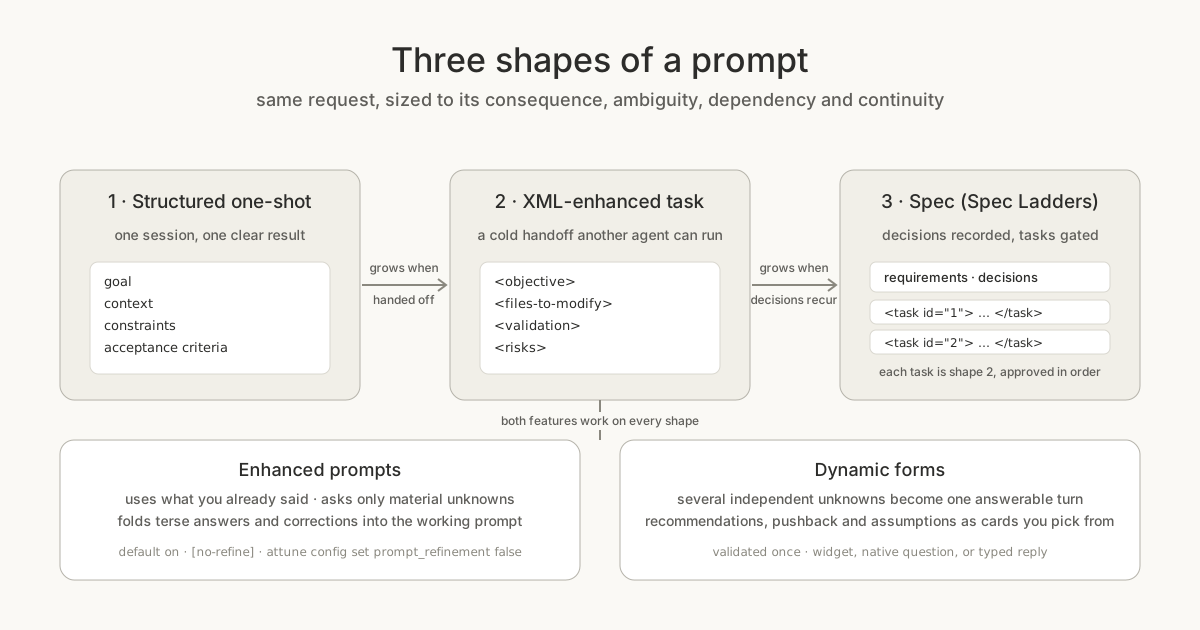
Most of what goes wrong with an AI coding agent goes wrong before it writes a line of code. You say something reasonable, the agent fills in what you did not say, and twenty minutes later you are reading a plan for the wrong thing. The usual fixes are worse than the problem: an agent that guesses and apologizes, or one that interrogates you through six sequential questions.
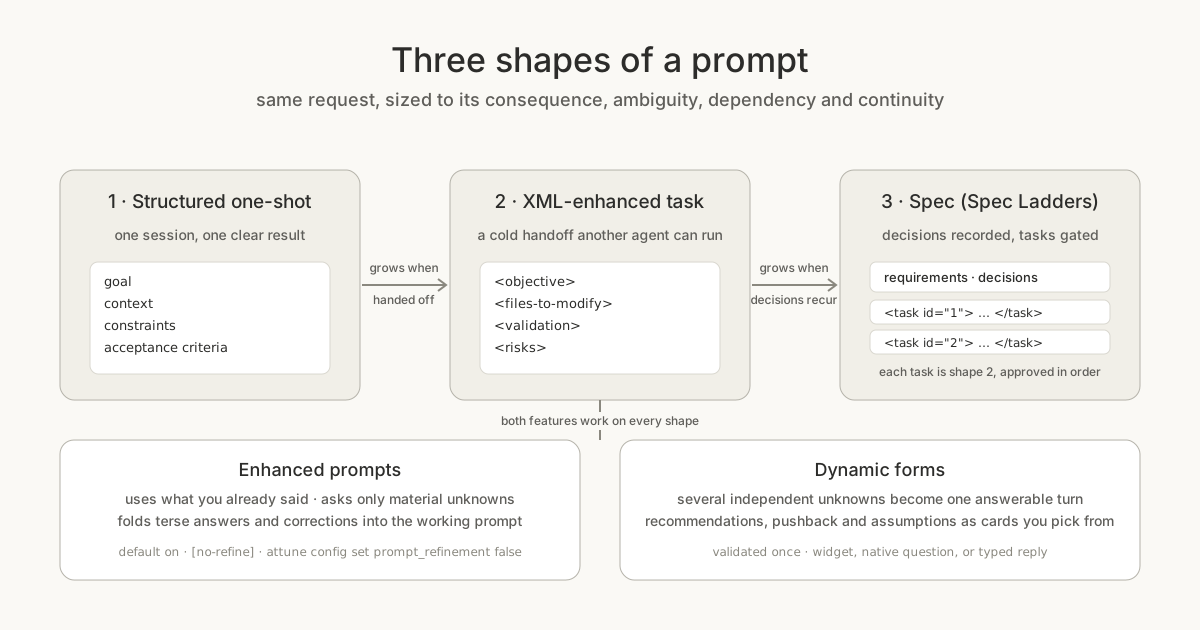
Attune takes a third position. Ask the material unknowns first, ask them once, then execute. Two features carry that position, and both work the same way whether the prompt you end up with is a quick one-shot, an XML-enhanced task you hand to another agent, or a full spec. This post walks through all of it on a real install. You can follow along in about fifteen minutes.
Before you start
Install Attune and check the two settings this walkthrough touches:
pip install attune-ai
attune config show
You should see these two lines among the output:
keyboard_mode = false
prompt_refinement = true (default; user-wide)
Then connect it to your host. In Claude Code, install the attune-ai
plugin; in any MCP client, add the Attune MCP server. The
prompt refinement guide
covers both, including the Codex hook. Reload the plugin or restart the
server after installing, or the host keeps running the old instructions.
Step 1: say something vague on purpose
Type this into your host, exactly as written:
Help me plan a website for a flower shop.
That request is missing at least three things a good plan depends on: who the site is for, what has to work at launch, and how deep you want the plan to go. Watch what the agent does with it.
With enhanced prompts on, the agent assesses the request before scoping. It uses what you already said (a flower shop, a website, a plan rather than a build), asks only for what it cannot infer, and keeps the count low. For a terse conversation the policy starts with at most three material questions and defers the rest. When you answer, even tersely, even with a correction, the answers fold into a working prompt. It does not restart the intake because you changed one thing.
You can see the policy the host is following, with no prompt text involved:
from attune.prompt_refinement import refinement_status

status = refinement_status()
print(status["enabled"], status["active"], status["source"])
# True True default
print(status["instructions"][:120])
Three controls, all of which you will want at some point:
For one message only, prefix the request. This skips optional refinement and keeps any clarification the task genuinely needs:
[no-refine] Summarize the changes in this diff.
To turn it off for your user account across projects (true turns it
back on):
attune config set prompt_refinement false
You can also just say "turn off prompt refinement" in the conversation. Three things it never does: make a separate model call, log your prompts, or change what the agent is allowed to execute. Refinement can add ordinary conversation turns; that is the whole cost.
Step 2: answer once, not three times
Here is where the second feature shows up. The three unknowns in the flower-shop request are independent of each other, so the agent asks them as one dynamic form instead of three turns:
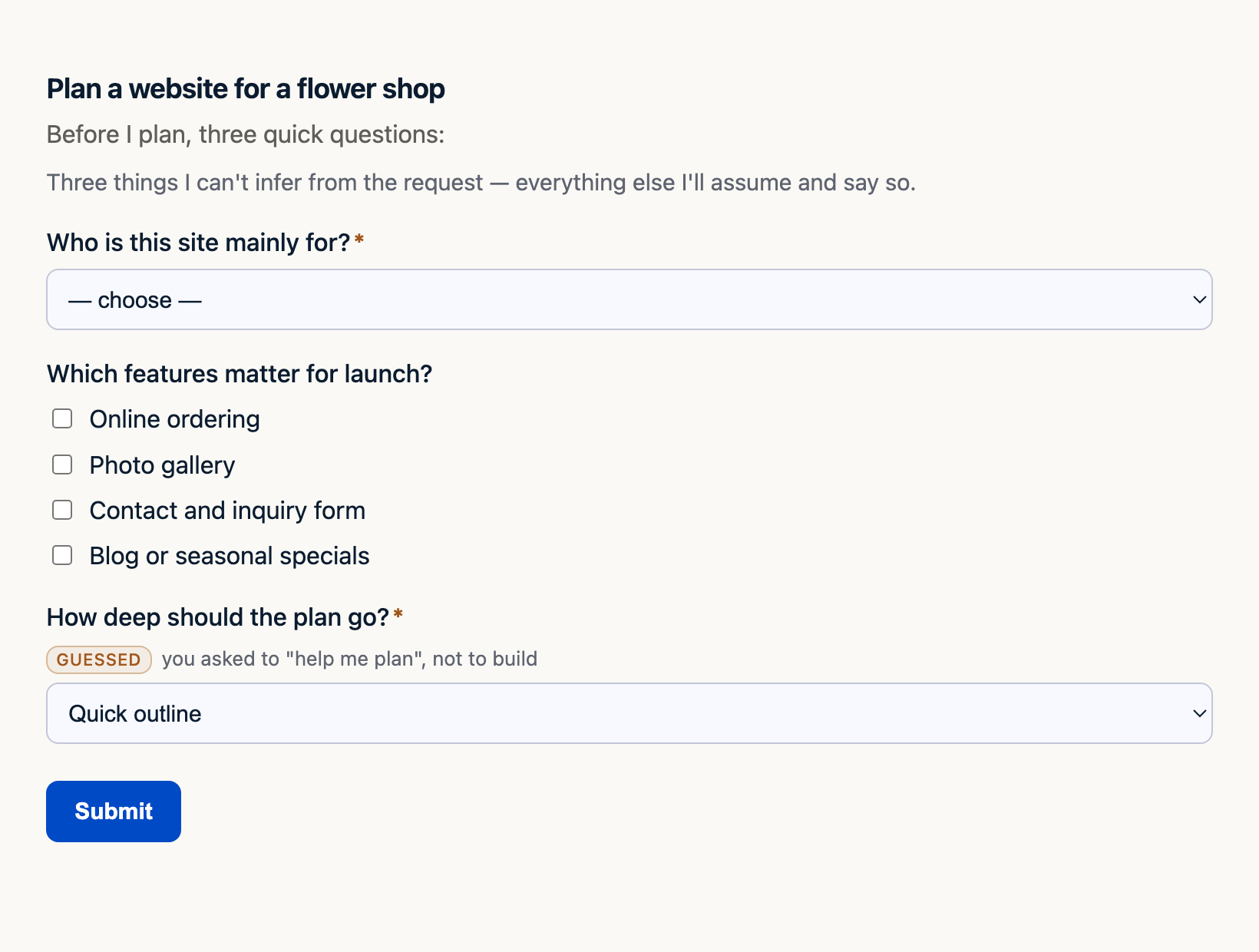
Three things to notice on that screen.
- The multi-select. "Which features matter for launch" takes several answers at once. A sequential question would have made you pick one or type a list.
- The GUESSED badge. The agent inferred "quick outline" from the words "help me plan" and says so. You confirm or change it in the same click as everything else. A guess you never saw is the one mistake a form cannot recover from, so the rule is infer, then confirm, never infer and skip.
- What is not there. Nothing the request already answered gets asked again. If you had written "a quick outline for a flower shop that takes online orders," the form would have had one field.
Where the form renders depends on your host. On a widget-capable client such as the Claude desktop app or Cowork, you get the card above. Codex users get Codex's own built-in question control by default, because the host's native control is the one users already trust. On hosts without a widget, the same form maps onto the host's native question, and if you prefer to type, say so or set keyboard mode:
attune config set keyboard_mode true # persists per project in attune.config.json
Every surface validates the same way. A missing required field or an answer outside the options comes back naming exactly the fields that failed, and the agent re-asks only those. Answers scope the work; they never grant the agent authority it did not already have.
The rest of the grammar
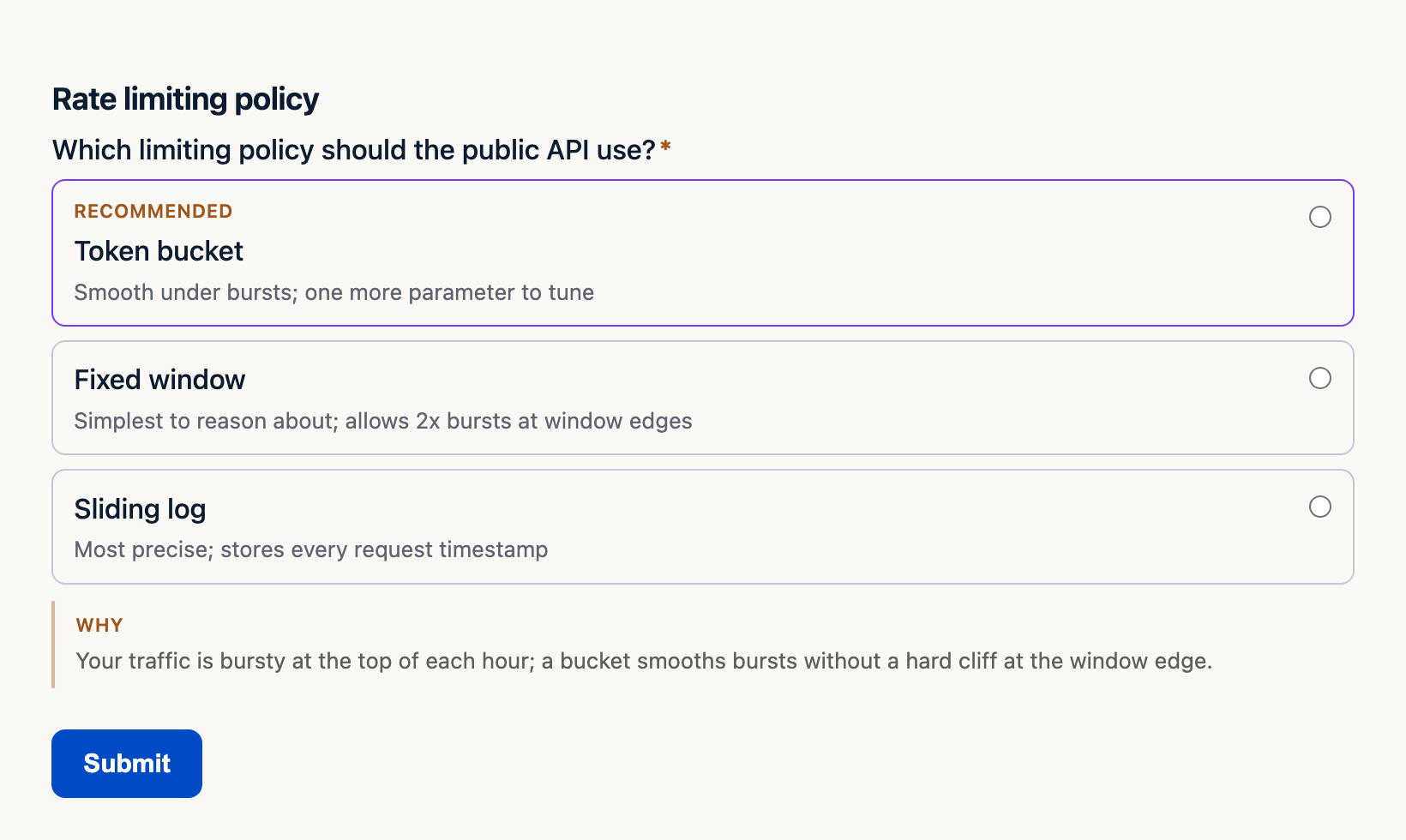
Intake is the plainest member of a family. Once the agent has something to say rather than something to ask, the form changes shape. A recommendation arrives as a decision card with the tradeoffs on each option and the reasoning underneath:
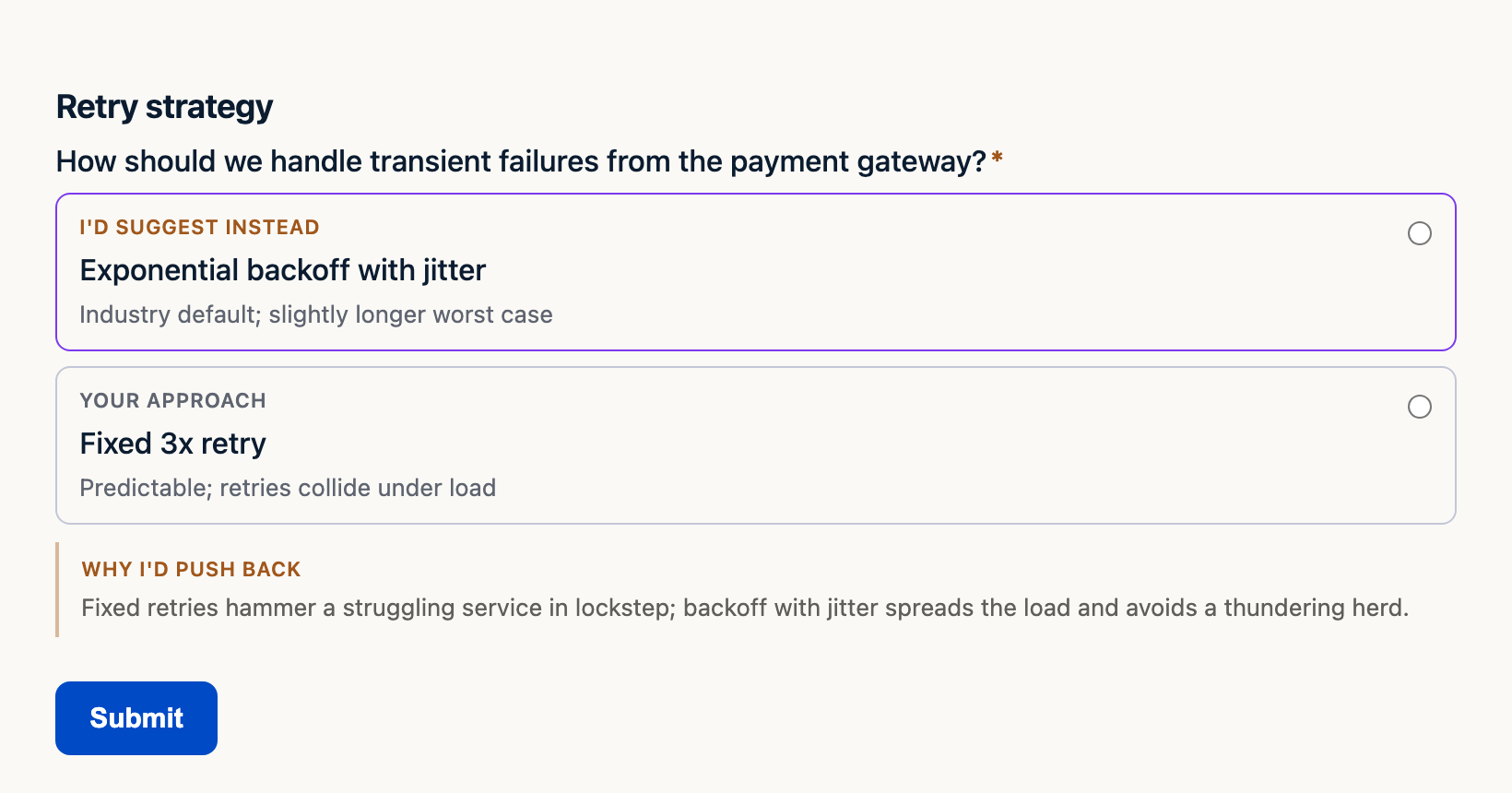
A disagreement arrives as a pushback card. Your approach is labeled as yours, the alternative sits beside it, and overruling the agent is one click:
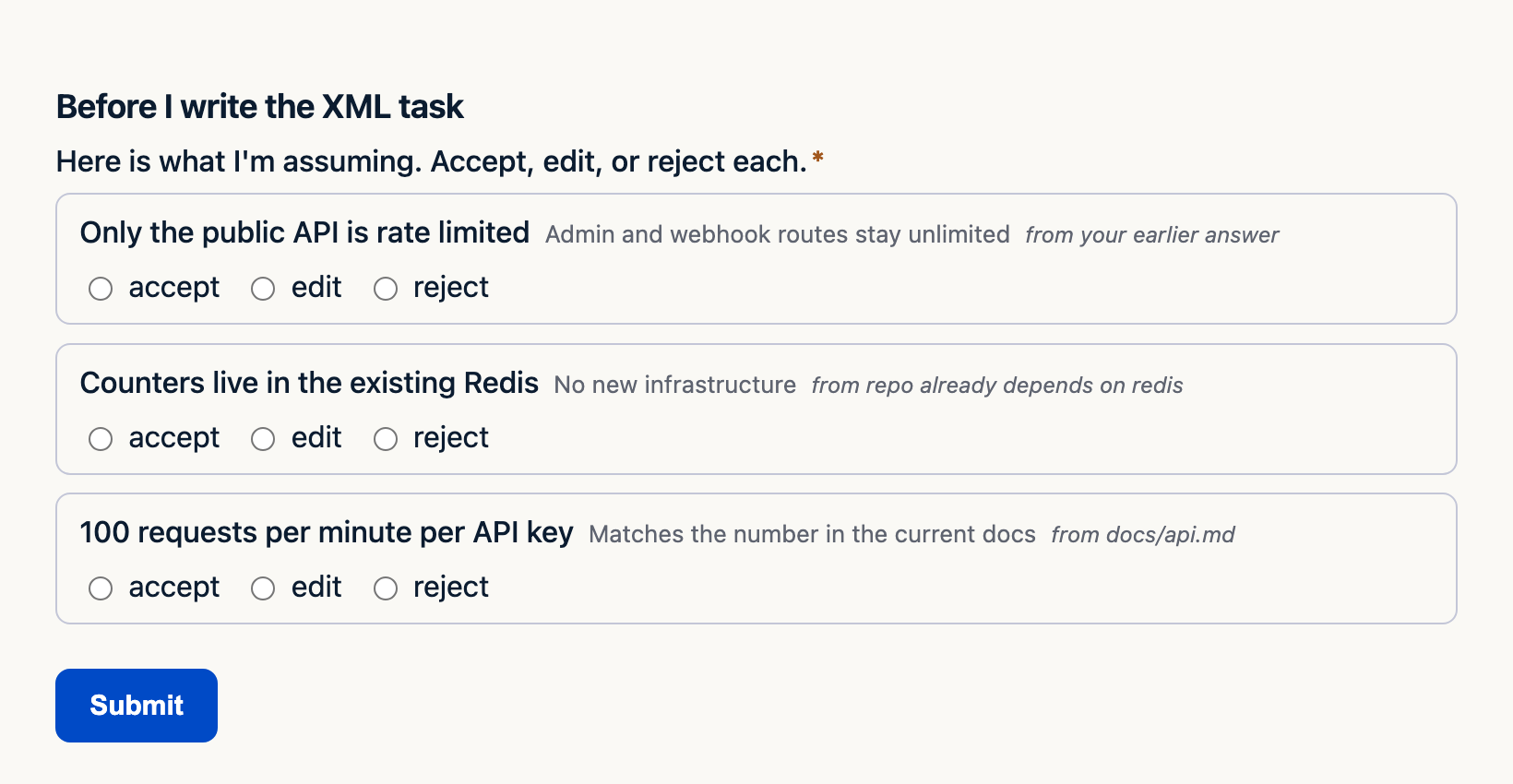
And before the agent commits to a plan built on inferences, an assumption review lays them out with their sources so you can accept, edit, or reject each one:
As of attune-forms 0.14.0 the family has nine members: intake, decision, pushback, progress (a status report whose blocked items are the picker), deliberation (several voices, endorsements visible), triage (per-item rulings across a board), confirm (a two-option gate with the consequences shown and deliberately no recommended option), ranking, and assumption review. Each is the same declarative form underneath, so you can build one yourself in a few lines:
from attune.elicitation import (
    collect_form_response,
    form_from_dict,
    form_to_widget_html,
)

form = form_from_dict({
    "title": "Rate limiting policy",
    "fields": [{
        "id": "policy",
        "text": "Which limiting policy should the public API use?",
        "type": "decision",
        "options": ["Token bucket", "Fixed window", "Sliding log"],
        "recommended": "Token bucket",
        "rationale": "Traffic is bursty at the top of each hour.",
        "option_notes": {"Fixed window": "simplest; allows 2x bursts at edges"},
    }],
})

html = form_to_widget_html(form)   # hand this to the host's widget surface
response = collect_form_response(form, {"policy": "Token bucket"})
assert response.responses["policy"] == "Token bucket"
That is the code that produced the decision card above. The screenshots in this post are the production renderer's output, captured headlessly; nothing was mocked up.
Step 3: the one-shot
After Step 2 the agent has a working prompt, and for a flower-shop plan that prompt is the finished artifact. This is the first shape, the structured one-shot: a goal, the context you supplied, the constraints, and the acceptance criteria, all in one bounded request that a single session can finish.
Goal: a quick outline for a flower shop website aimed at walk-in
customers finding hours and directions.
Context: features for launch are a photo gallery and a contact form;
online ordering is out of scope for now.
Constraints: static hosting, no accounts, mobile first.
Done when: the outline lists pages, the content each page needs, and
one open question per page for the owner.
Nothing about that needs a file. It can be a paragraph in the conversation. A one-shot is the right shape when the change is clear, the risk is low, and nothing else depends on it. Most requests should end here, and the two features exist so that they can.
Step 4: grow it into an XML-enhanced task
Now change the request. Suppose the real job is to add rate limiting to your API, and you want a different agent, or a future session, to carry it out without you in the room. The one-shot stops being enough, not because the diff is bigger but because the prompt has to survive a cold start.
That is the second shape, the XML-enhanced task. Reach for it when any of these holds:
- the prompt is a cold handoff to another agent or session, so it cannot lean on the current conversation;
- dependent changes have to happen in an explicit order;
- there is material risk to authorization, retained data, or compatibility, so the boundaries and mitigations need stating;
- something parses it, such as Attune's spec reader.
File count does not decide. A routine rename across ten files is a one-shot; a one-file authorization fix may need an XML task.
The assumption review from Step 2 is how the task's premises get settled first. Then the task itself looks like this:
<task id="rl-1" name="public-api-rate-limit">
  <objective>
    Add token-bucket rate limiting to the public API, 100 requests per
    minute per API key, using the existing Redis.
  </objective>
  <context>
    <existing-code path="src/api/middleware.py">
      Middleware chain; auth runs first and attaches request.api_key.
    </existing-code>
  </context>
  <files-to-modify>
    <file path="src/api/middleware.py">
      <change location="after AuthMiddleware">
        BEFORE: chain = [AuthMiddleware()]
        AFTER:  chain = [AuthMiddleware(), RateLimitMiddleware(limit=100)]
      </change>
    </file>
  </files-to-modify>
  <validation>
    <check>101st request within 60s from one key returns 429</check>
    <check>admin and webhook routes are unaffected</check>
    <check>pytest tests/api/test_rate_limit.py passes</check>
  </validation>
  <risks>
    <risk severity="medium">Redis unavailable: fail open and log, never block traffic</risk>
  </risks>
</task>
Validation comes before implementation on purpose. The receiving agent knows what "done" means before it reads how to get there, and a reviewer can check the task without running it.
Step 5: grow it into a spec
One more escalation. Suppose rate limiting is one piece of a larger change to how your API handles abuse, the design has open questions, and the work will span several sessions and pull requests. Now you want the third shape: a spec.
In Attune that is Spec Ladders (/spec). Say /spec in your host and
the intake is, again, one form:
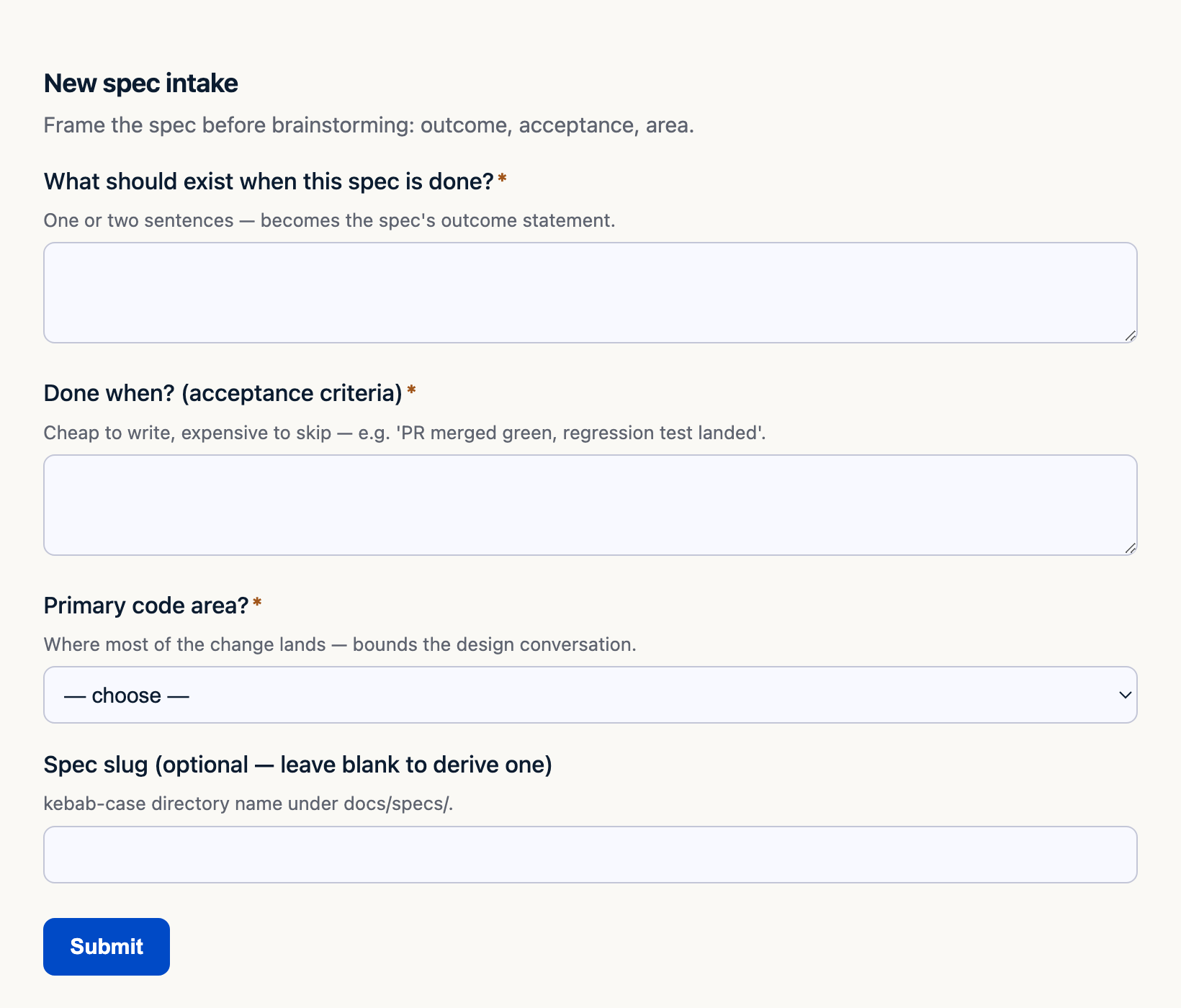
From there the ladder runs brainstorm, plan, review, approve, execute. Decisions get recorded as they are made, so a session next week can read why the design went the way it did instead of relitigating it. Review picks arrive as decision and pushback cards, the same ones from Step 2, and every approval is recorded.
The important point, and the reason this post treats the three shapes as a ladder rather than three alternatives: a spec's tasks are XML-enhanced prompts. The spec reader parses the task blocks, the ladder executes them in order, and each one is approved before it runs. Shape three contains shape two, and every task inside it was scoped by the same features that scoped the one-shot in Step 3.
Choosing the shape
Size the prompt to four properties, not to the number of files:
| Ask yourself | One-shot | XML task | Spec |
|---|---|---|---|
| Consequence if it goes wrong | low, reversible | material, needs stated boundaries | irreversible choices need a record |
| Ambiguity in the design | none left after intake | none left, but the receiver was not in the room | unresolved; the brainstorm is the point |
| Dependency between changes | none | ordered steps | many tasks, gated in sequence |
| Continuity | one session | one cold handoff | several sessions or PRs |
When you are unsure, start smaller. A one-shot that turns out to need a handoff becomes an XML task by adding structure to what you already wrote. Nothing is lost by escalating late; plenty is lost by starting with a spec for a one-line fix.
What to expect, honestly
- Refinement adds turns. When a request is already clear it adds none,
and you can silence it per message with
[no-refine]. - A form costs a beat compared with a sentence. If a question is worth asking, it is worth asking legibly, and the batching rule keeps it to one form rather than several.
- Host support differs. Codex defaults to its built-in questions. Claude's widget renders on widget-capable clients; elsewhere the form maps onto the host's native question, which has no number, date, or long-text control, so those fields come to you as typed questions. Desktop rendering and keyboard behavior on the newest hosts are still being verified, and the docs say so rather than assume.
- Nothing is stored. Refinement keeps only its on/off setting in
~/.attune/prompt-refinement.json; forms keep their answers in the conversation.
Try it
Install, type the flower-shop line, and count the questions. Then take
a task you would normally paste into a fresh session and write it as an
XML task with the validation block first. If you find yourself writing
the third such task for the same feature, that is the moment to type
/spec.
The forms in this post are in the
attune-forms package,
which attune-ai bundles. The refinement policy lives in
attune-ai under
src/attune/prompt_refinement.py. Both are Apache 2.0.