Technical walkthrough of the local CSV export prototype
This companion preserves the implementation and execution record behind “Build with AI from an idea to a working feature.” It documents the original command-line exporter, its bounded replay through attune-harness and the owner-reported Numbers acceptance check. The later export-form prototype is a separate iteration described in the main article.
The commands describe a recorded run, not a ready-to-run installation recipe. A new run needs its own prepared inputs and current checkpoints. The planning-form image below is illustrative, reconstructed from recorded requirements; it is separate from the actual export-form screenshot in the main article.
Carry decisions into working code
Ground the specification in project policy and authoritative references. In the CSV example, the prototype’s existing activity selector defined which rows could appear. Python’s CSV documentation guided file handling, and OWASP’s guidance informed the treatment of formula-like text.
I chose a spreadsheet precaution that changes some exported values: the CSV exporter adds an apostrophe to text matching specified formula-risk patterns. The list output preserves the original text. Recording that choice gave the AI a clear rule to implement and gave me a specific result to check.
The coding assistant used attune-harness plan to retain the request. Review exposed gaps in the checks for quoting, partial-file cleanup and malformed inputs. Separate supplemental tests addressed those gaps before implementation, and the request was revised to include them.
Illustrative completed form
Illustrative fields and answers, reconstructed from the recorded requirements; no question form was submitted during this run.
Screenshot of the attune-harness 1.4.0 local intake interface, using attune-forms 0.17.0. The approved example answers were entered in an isolated draft; they were not saved or approved.
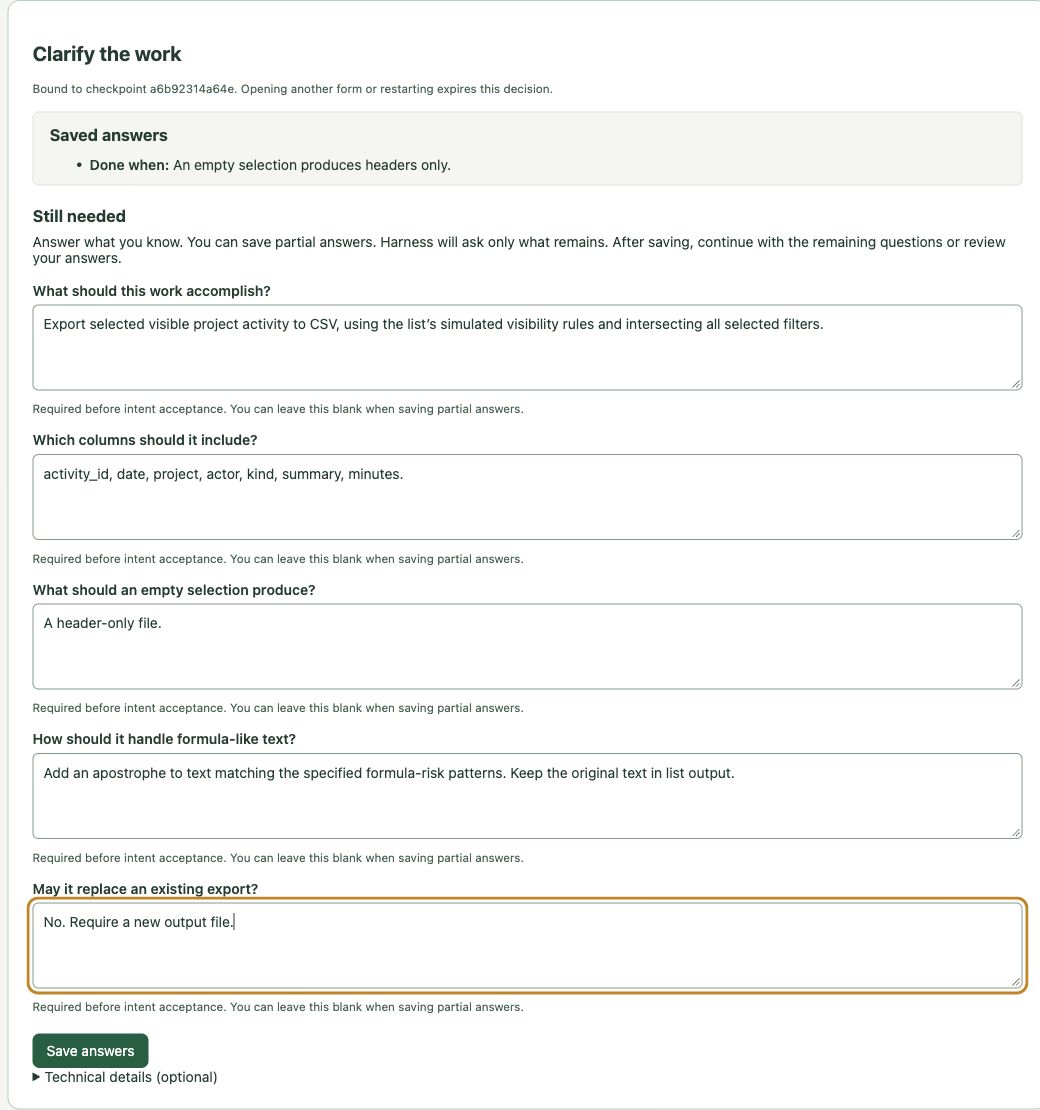
The result was a specification that carried useful decisions into the work. A reviewer’s concern became a check, rather than a comment that could disappear during a handoff. The process reinforces safer engineering habits by making boundaries explicit, bringing consequential choices to the user and checking results before acceptance.
The library already selects prompt, XML or spec from explicit work facts supplied by the host assistant. The assistant must identify consequential unknowns and supply those facts accurately. Selection alone cannot discover a requirement nobody recorded.
You can work through tools such as Codex or Claude Code while keeping direction and consequential choices with you.
Tip: Keep consequential choices in your hands
When a decision needs your judgment, ask the AI for a recommendation, meaningful alternatives and their consequences. A focused question or form can help you choose. Let settled work continue without unnecessary interruptions.
Test the implementation against the agreed behavior
For this prototype, coding assistants authored and reviewed the code outside the library’s build workflow. They added CSV writing after the existing activity selector, so list and export used the same simulated visibility rules. The first accepted plan lacked the file-effect manifest required for an attune-harness build. That boundary remained in the record.
The implementation passed 66 local checks. The checks covered filter combinations, inclusive dates, stable ordering, empty output, quoting and formula-like text. They also checked refusal to overwrite an existing file and cleanup after an injected write failure.
attune-harness test captured the source change and previewed the two selected test files. After inspecting that preview and its limits, the host assistant accepted its checkpoint under the existing authorization. The library then ran the captured tests.
These commands are shortened only by normalizing workspace paths and replacing recorded checkpoints with placeholders. They describe the recorded run; a new attune-harness run needs its own prepared inputs and current checkpoint.
attune-harness test --project csv-activity-prototype \
  --scope activity_report.py \
  --tests tests/test_activity_report.py \
  --tests tests/test_export_supplemental.py \
  --interpreter python3 \
  --goal "Check actual filtered CSV files against the frozen standalone contract" \
  --task-dir evidence/harness-test --timeout 30 \
  --max-output-bytes 16384 --pytest-arg=-q

attune-harness test --task-dir evidence/harness-test \
  --checkpoint <current-test-checkpoint> --accept
The result was 66 collected, 66 passed, none failed and none skipped, with zero model calls. Retaining the tested files and the execution result made the checks inspectable after the handoff. A passing result covered this selected local scope; it did not establish every possible behavior.
Apply the feature through a bounded build
The next run returned to the preserved list-only baseline in a separate checkout. The host prepared a new plan with one permitted source replacement, activity_report.py, and ten protected files. Those files included the fixture, tests, specifications and check scripts. The host prepared the manifest through the installed work_effects.freeze API, then used plan to record and accept the new scope.
attune-harness plan --request evidence/build/request.json \
  --project harness-build-prototype \
  --config evidence/build/participants.json \
  --task-dir evidence/harness-build

attune-harness plan --task-dir evidence/harness-build --accept \
  --checkpoint <current-draft-checkpoint>
The library reported that this new accepted plan was ready for build. The allowed file change and required checks were now concrete before execution began.
attune-harness build applied the known implementation through two inspected local command participants. One supplied the source that the coding assistants had already written and reviewed. The other validated its hash and the check receipts.
attune-harness build evidence/harness-build \
  --checkpoint <current-accepted-checkpoint> \
  --allow-external --max-operations 12
The build completed six durable operations:
- Check that the baseline still lists the expected activities and has no export command.
- Obtain the known source from the local worker.
- Replace the one allowed source file.
- Check the actual filtered CSV: two records and exactly 213 bytes.
- Run the protected acceptance suite: all 66 tests passed.
- Validate the source hash and required check receipts: no findings.
All ten protected files remained unchanged. The library retained the file change and the checks under the same accepted scope. The local participants supplied existing code and validated receipts; the library did not generate this feature through a native model. The external flag allowed the inspected local commands in this run; native model execution remained disabled.
Check the result before accepting it
Tell the exporter which project, activity type and dates you want. It searches the sample activity records and exports the matching rows that the example user is permitted to access. This prototype uses simulated user-access rules. Run the command from the completed prototype directory with a fresh output filename; existing files are preserved.
mkdir -p out
python3 activity_report.py export --user viewer \
  --project atlas --kind review \
  --from 2026-10-11 --to 2026-10-12 \
  --output out/reviews.csv
The recorded export reported “Exported 2 activity rows.” Its records were a-0002 and a-0004, with seven columns. The multiline Café summary survived, and the formula-like summary received the agreed apostrophe prefix. A request for an inaccessible project produced headers only. Repeating the same selection produced identical bytes. The later build produced the same filtered file.
attune-harness status showed the completed test and build results in their separate task records.
attune-harness status evidence/harness-test
attune-harness status evidence/harness-build
These records distinguish accepted scope from completed execution. Independent host review confirmed the build evidence and unchanged protected files. Its later Git status query refreshed the checkout’s index, so reusing the whole saved checkout requires a fresh scope check; the recorded build result and verified source bytes remain intact.
The owner still needs to decide whether the evidence answers the requirements. This example establishes a working standalone export using synthetic data and simulated identity. Production access control remains unverified. Apply your project’s approval requirements before deployment or publication; a completed task does not grant that permission.
Native model-driven planning and building remain experimental in attune-harness 1.4.0. This case demonstrates local coordination of host-authored code and protected checks, without paid model calls.
I opened the exported file in Numbers and confirmed that it worked. I saved a copy, closed it and reopened it. The two records, multiline text and formula-like text still looked right.
That completed my acceptance check for this Numbers workflow. The result is owner-reported; the Numbers version was not recorded, and CSV re-export fidelity and other spreadsheet applications were not checked.
Related Articles
Build with AI from an idea to a working feature
See how a human–AI team turns ideas into specifications, working code and checked results, using a real CSV prototype with attune-harness.
The Receipt Beats the Promise: Shipping an AI Fix That Proves Itself
Every AI coding tool says it fixed your bug. attune fix has to prove it — with a receipt built from independently re-run verification commands. Then a cold UX review caught the receipt itself lying on the happy path, and the fix for that is the most interesting part of the story.