Build with AI from an idea to a working feature
For me, the delight of working with AI is the opportunity to explore an idea, try a prototype and discover which creative options are worth pursuing.
In this example, I wanted to select project activity in a spreadsheet without copying rows by hand. I asked the assistant to generate the CSV, opened it in the default spreadsheet application, saved a copy, closed it and reopened it. The two records and their multiline text still looked right.
Using the result raised the next question: how would I choose the rows for another export? That question led to a small form. Working through the feature helped me discover what I wanted next.
You bring purpose and judgment. Coding assistants help explore alternatives and implement decisions. attune-harness carries agreed work into bounded execution and checks. Together, these support three practical outcomes:
- Give the AI a clear definition of done.
- Carry decisions into working code.
- Check the result before accepting it.
Give the AI a clear definition of done
“Add CSV export” left choices open. Which rows belong in the file? Should existing access rules apply? What should an empty report contain? How should it handle formula-like text?
The local prototype already listed synthetic activity using simulated project membership and row restrictions. The export needed to use that same selection. The specification made the outcome concrete: combine the selected filters, include both date boundaries, sort the rows consistently, export seven agreed columns and leave out internal access metadata. An empty selection would produce headers only. Existing output files would be preserved.
Those decisions gave the assistant something specific to implement and gave me something specific to check.
Trying the result exposed another requirement: making the selection easier to use again. I approved project and activity-type dropdowns, date pickers, a matching-row count before export and a filename field that would preserve existing files. Those choices gave the next iteration its definition of done.
When an important assumption remains uncertain, ask your assistant to propose a small experiment. State the question, the disposable scope and what the result will help you decide. Use the evidence to settle the next decision; promoting the prototype into production remains a separate choice.
Use the amount of structure the work needs
Attune’s established guidance distinguishes a brief inline instruction, a structured one-shot request, an XML task contract and a specification. Choose by uncertainty, consequences, dependencies and continuity, after checking existing workflow requirements. You do not have to progress through all four.
A bounded request may need only clear prose with context, constraints and acceptance criteria. A cold handoff, dependent work or consequential access and compatibility risks may justify an XML task contract. Preserve XML when a tool parses it; otherwise, equivalent structured text can carry the information. Unresolved design decisions or work spanning sessions justify a specification that retains them.
The useful work is recording the decisions and boundaries. A format cannot supply a requirement nobody identified.
Carry decisions into working code
Ground the specification in project policy and authoritative references. Here, the existing activity selector defined which rows could appear. Python’s CSV documentation guided file handling, and OWASP’s guidance informed the treatment of formula-like text.
I chose a spreadsheet precaution that changes some exported values: add an apostrophe to text matching specified formula-risk patterns. The list output preserves the original text. Recording that choice gave the AI a clear implementation rule and me a particular result to inspect.
The coding assistant used attune-harness plan to retain the request. Review exposed gaps in the checks for quoting, partial-file cleanup and malformed inputs. Separate supplemental tests addressed those gaps before implementation, and the request was revised to include them. A reviewer’s concern became a check that could survive a handoff.
Coding assistants authored and reviewed the code outside the library’s build workflow. The implementation passed 66 local checks. attune-harness test then captured the selected source and tests for inspection and ran the accepted test scope.
What happens between your decisions
Once the work is agreed, the library can carry the accepted scope through execution and retain evidence for review. In this example, a later bounded build applied the known implementation to a preserved list-only baseline. The accepted scope permitted one source replacement and protected ten other files.
The recorded build carried out six operations under that scope:
- Check the starting state, obtain the known source from an inspected local worker and replace the one permitted file.
- Check the actual filtered CSV and run the protected acceptance suite. All 66 tests passed.
- Validate the source hash and required check receipts. The ten protected files remained unchanged.
The library retained the file change and check results in its task record. You could inspect what had been accepted and what had actually completed without reconstructing the work from a conversation.
This gives you a useful division of responsibility: settle the goal and consequential boundaries, let work within the accepted scope continue, then judge the evidence. If a new choice would change the agreed scope, permissions or commitments, bring that choice back to the owner under the project’s approval requirements. Repeating a settled decision at every step adds little value.
Coding assistants supplied the implementation; the inspected local participants supplied that existing code and validated receipts. The library did not generate this feature through a native model. Native model-driven planning and building remain experimental in attune-harness 1.4.0.
Let feedback shape the next iteration
The next local prototype used attune-forms 0.17.0 to connect the approved form controls to the existing exporter. Its default selection produced a CSV byte-for-byte identical to the earlier command-line file. Twenty focused checks passed for this form prototype, separately from the 66 exporter checks.
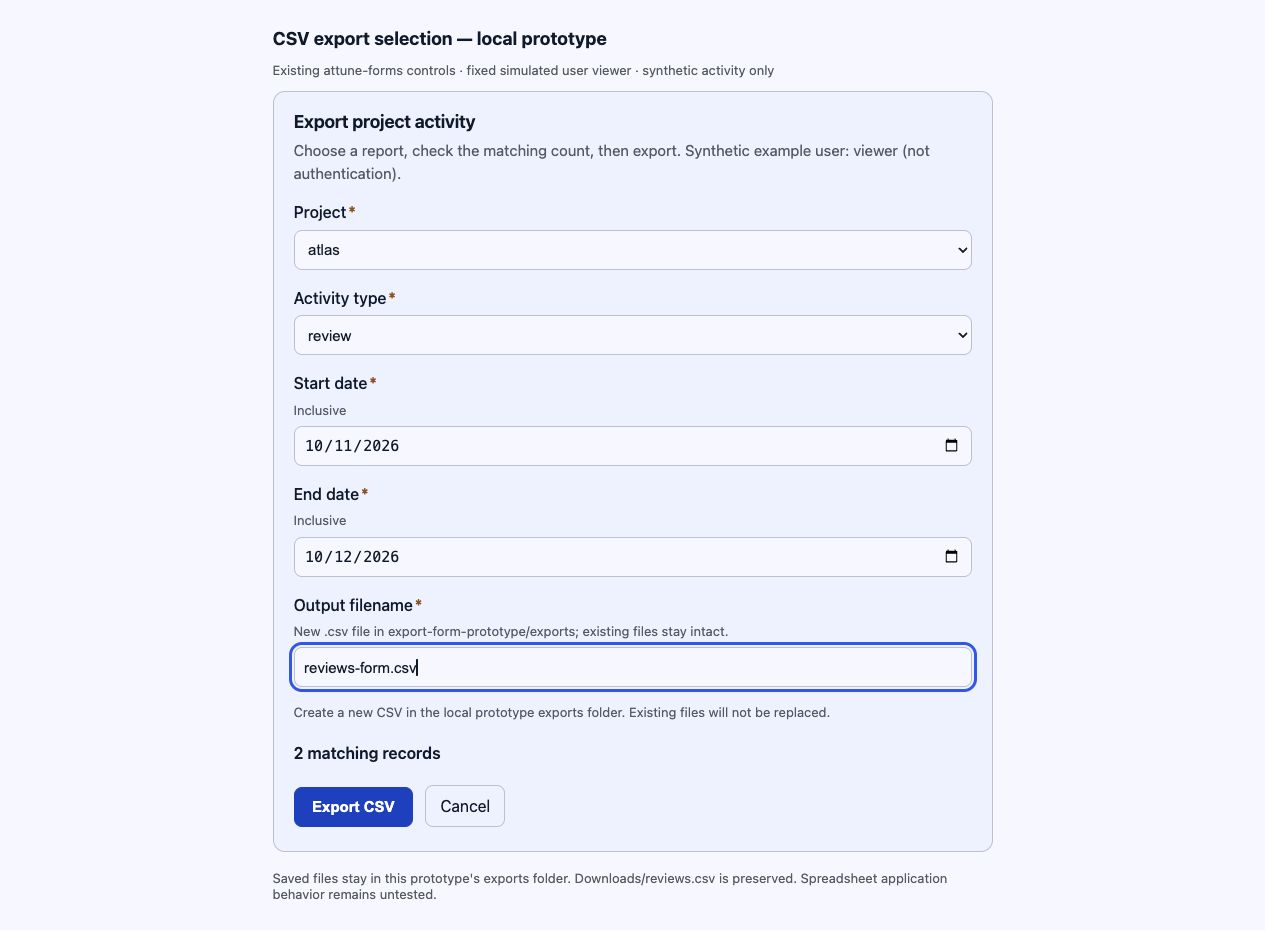
Actual local export-form prototype. The controls choose matching records before export; the screenshot is not an interactive form. The earlier command-line export was the file I checked in Numbers. The form uses synthetic data and a fixed simulated viewer, not production authentication.
You choose the project, activity type and dates. The exporter finds the sample records that match all those choices within the example user’s simulated access. You do not need to select individual rows. The form shows how many match before export.
This is a practical role for the person directing the work: decide what the feature should help you do, try the result and use what you learn to choose the next improvement.
When a decision needs your judgment, ask the AI for a recommendation, meaningful alternatives and their consequences. A focused question or form can help you choose. Let settled work continue without unnecessary interruptions.
Check the result before accepting it
The automated checks covered filter combinations, inclusive dates, stable ordering, empty output, quoting and formula-like text. They also covered refusal to overwrite an existing file and cleanup after an injected write failure.
The recorded export contained two records, seven columns and exactly 213 bytes. Repeating the selection produced identical bytes. A request for an inaccessible project produced headers only. These results established the selected local behavior; they did not establish every possible behavior.
My acceptance check was to use the file in Numbers. I opened it, saved a copy, closed it and reopened it. The two records, multiline text and formula-like text still looked right.
That completed my acceptance check for this Numbers workflow. The result is owner-reported; the Numbers version was not recorded, and CSV re-export fidelity and other spreadsheet applications were not checked.
The owner still needs to decide whether the evidence answers the requirements. This example uses synthetic data and simulated identity. Production access control remains unverified. Apply your project’s approval requirements before deployment or publication; a completed task does not grant that permission.
The accompanying technical walkthrough preserves the recorded commands, accepted scopes, checks and limitations for readers who want to inspect how the work was carried through.
The CSV feature began with a practical need: use project activity in a spreadsheet without copying rows by hand. Working with an AI assistant turned that need into code I could test and use. Using it revealed the next improvement: a form that made choosing the rows easier. That is the creative value of this partnership. You can explore an idea, build something tangible, and let experience inform what comes next.